

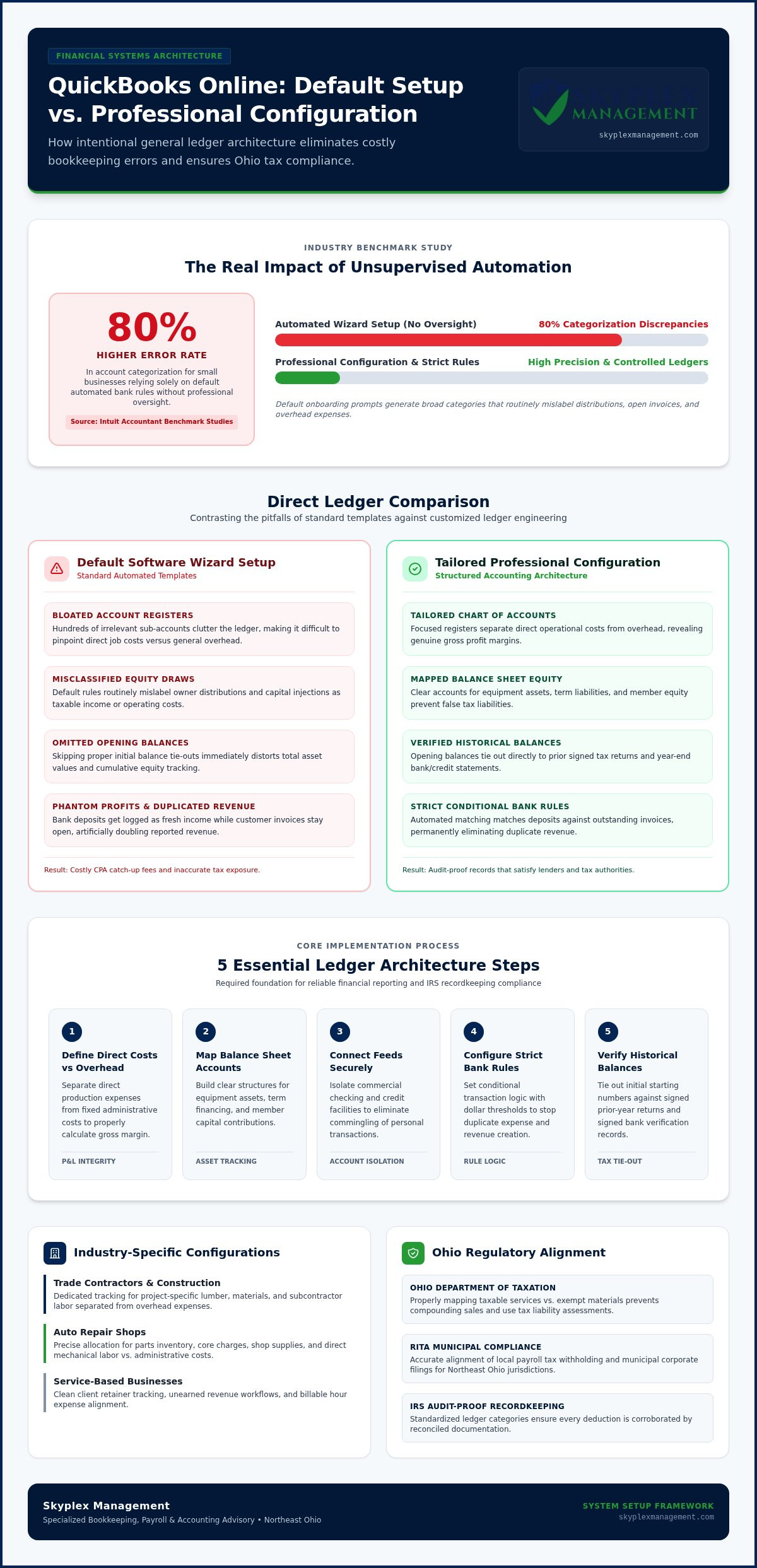
Relying on default software automation to manage your books often creates chaos instead of clarity. According to Intuit Accountant Benchmark Studies, small businesses that depend entirely on automated bank feed rules without professional oversight face up to an 80% higher error rate in account categorization. When you are searching for reliable QuickBooks Online setup help, sorting through duplicated transactions and an out-of-the-box Chart of Accounts can quickly turn an afternoon project into a lingering operational headache.
You likely invested in accounting software to save time, not to spend late nights untangling messy ledgers or stressing over local sales tax and payroll compliance. In this guide, you will discover how professional QuickBooks Online setup eliminates costly bookkeeping errors, streamlines tax compliance, and establishes clear financial visibility for your trade or service business. We will walk through the exact steps needed to build an industry-specific ledger, clean up your automated workflows, and generate reports your tax professional and banking partners will respect.
Key Takeaways
- Learn why relying on generic software wizards distorts your profit margins and how a customized general ledger protects your bottom line.
- Discover how specialized QuickBooks Online setup help equips contractors and auto repair shops to track job costs and parts accurately.
- Streamline automated bank feeds and reconciliation rules to permanently eliminate duplicated expenses and ledger discrepancies.
- Properly align payroll liabilities and sales tax workflows to stay compliant with Ohio Department of Taxation and RITA requirements.
- Turn your financial records into a reliable decision-making tool that satisfies lenders and gives you complete operating clarity.
The Hidden Risks of Default Setup vs. Professional Configuration
Clicking through a standard onboarding wizard seems harmless when launching new accounting software. Intuit promotes automated tools as a quick fix, promising a fully functional ledger in minutes. In reality, these automated routines install generic templates that obscure your genuine operating margins. Getting hands-on QuickBooks Online setup help early on acts as preventative care, stopping common configuration traps before they distort your balance sheet.
Why Software Wizards Fail Growing Businesses
Default onboarding prompts ask broad questions about your industry, then generate hundreds of standard sub-accounts that have nothing to do with your daily operations. A standardized chart of accounts structure should reflect your specific trade, yet automated setups introduce immediate friction:
- Bloated Account Registers: Irrelevant categories clutter your ledger, making it difficult to pinpoint direct job costs versus general administrative expenses.
- Misclassified Equity Draws: Default rules routinely mislabel owner distributions and personal capital injections as taxable business revenue or standard operating expenses.
- Omitted Opening Balances: Skipping proper opening balance entries throws off asset values and equity tracking right from the start.
When software guesses how your business operates, internal controls break down. Without customized rules, routine bank downloads quickly scramble your books.
The True Cost of DIY Bookkeeping Errors
Unvetted automated bank rules cause compounding discrepancies across your financial statements. A common mistake occurs when downloaded deposits get categorized as fresh income while the corresponding customer invoices remain open. This single error artificially doubles your reported revenue, generating an illusion of phantom profits that can trigger an unexpected income tax bill.
Left unchecked, these balance sheet mismatches snowball throughout the year. When tax season arrives, CPA firms often bill substantial catch-up fees to untangle duplicate entries and reclassify misposted expenses before they can even file a return. Seeking professional QuickBooks reconciliation services can correct persistent ledger mismatches, but establishing the correct foundation from day one saves significant time and money.
Investing in professional configuration secures reliable records, prevents compliance penalties, and delivers the exact financial visibility you need to run your business with complete peace of mind.
Essential Architecture: Building a Tailored Chart of Accounts and Bank Feeds
A reliable accounting system starts with intentional design, not automated assumptions. When you seek professional QuickBooks Online setup help, the priority is structuring your ledger so day-to-day data entry translates into actionable management reports. Setting up this structure involves five fundamental steps:
- Define direct costs versus overhead: Separate your direct production expenses from fixed administrative costs.
- Map balance sheet accounts: Build clear accounts for equipment assets, term liabilities, and owner equity draws.
- Connect bank feeds securely: Isolate commercial checking and credit card lines to stop personal transaction intermingling.
- Configure strict bank rules: Set conditional logic with specific thresholds to avoid duplicate expense creation.
- Verify historical balances: Tie out opening balances directly to prior signed tax returns and year-end statements.
Following IRS business recordkeeping guidelines requires supporting every deduction with clear documentation. A structured general ledger provides the audit-proof foundation your business needs.
Customizing Your Chart of Accounts Structure
Separating direct operational costs from overhead gives you an accurate view of your gross profit margins. If a trade contractor buries project-specific lumber and subcontractor fees inside generic operating expenses, their profit-and-loss statement will never reflect actual job performance. Keep account categories focused and intentional. Build dedicated sub-accounts for vehicle fuel, equipment repairs, and software subscriptions, but avoid creating a separate line item for every single vendor.
Establishing Clean Bank Feed Integration
Automated bank feeds save significant time, but they require precise handling to maintain clean records. When merchant processors batch daily payments, adding those bank deposits without linking them to original invoices causes doubled income. Establishing transfer clearing rules prevents this common error. Enforcing standardized vendor names also keeps your expense histories organized and reliable.
Getting your chart of accounts and feeds configured correctly from day one protects your time and sanity. If you want to ensure your ledger is built accurately around your unique operational workflows, you can reach out to our team at Skyplex Management to coordinate a smooth setup.
Industry-Specific Configuration: Adapting QBO for Trades, Auto Repair, and Professional Services
Generic accounting configurations fall short because distinct business models produce revenue and incur costs in completely different ways. Seeking industry-specific QuickBooks Online setup help ensures your general ledger mirrors your actual operating workflow. Tailoring products, services, and two-sided items connects daily billing directly to your underlying cost structure.
Job Costing Workflows for Construction and Contractors
General contractors need to know whether a specific project is profitable long before the final punch list wraps up. Configuring two-sided items connects material orders and trade subcontractor bills directly to project estimates. Setting up milestone progress invoicing preserves operating cash flow across lengthy multi-stage builds. In addition, collecting and logging W-9 data inside vendor profiles ensures your records align with IRS small business recordkeeping guidelines before issuing the first subcontractor payment.
Inventory and Labor Tracking for Auto Repair Shops
Automotive repair facilities face unique operational splits between mechanical labor, sublet vendor services, and physical parts. Setting up precise item categories maps parts inventory adjustments directly to Cost of Goods Sold whenever a repair order closes. This structure separates high-margin diagnostic labor from parts markups on client invoices. Integrating shop management tools like Shopmonkey or Mitchell 1 directly into QuickBooks Online keeps repair orders, technician hours, and daily drawer reconciliations in sync.
Client Trust and Retainer Setup for Professional Services
Service providers often manage client retainers and pass-through project expenses. Treating upfront retainers as immediate revenue distorts current-period earnings and creates artificial tax liability. Professional configuration routes these upfront funds into dedicated current liability accounts, recognizing income only as hours are billed. Setting up automated billable expense tracking also prevents project disbursements from slipping through the cracks.
Turning to professional small business bookkeeping services guarantees these industry-specific settings operate cleanly month after month, giving you dependable data for every business decision.
Integrating Payroll, Invoicing, and Ohio Tax Compliance
Connecting operational workflows to your general ledger requires more than checking a few automated sync boxes. When you rely on professional QuickBooks Online setup help, payroll runs and customer invoices feed directly into balanced liability registers without leaving unallocated balances behind. Small business owners across Northeast Ohio face layered tax jurisdictions that standard software wizards fail to anticipate.
Navigating Ohio Municipal and State Payroll Withholdings
Payroll configuration errors can disrupt month-end financial reconciliations. An improperly mapped payroll clearing account causes discrepancies between the gross wages entered in your software and the actual net withdrawals clearing your bank. For companies in Cleveland, Akron, and Canton, municipal income tax rules add operational complexity. Agencies like the Regional Income Tax Agency (RITA) and the Central Collection Agency (CCA) require precise city withholding tracking based on where work occurs, such as complying with Ohio's 20-day occasional entrant rule for mobile field crews. Aligning your wage categories prevents unexpected local non-compliance notices.
Automating Sales Tax and Payment Processing
Sales tax rates shift quickly across county borders. In Cuyahoga County, the combined rate reaches 8.00%, while Summit and Medina counties stand at 6.75%, and Stark County sits at 6.50%. Applying an inaccurate flat percentage leads to audit liabilities with the Ohio Department of Taxation. To handle these variations cleanly, configure your software with these standard safeguards:
- Enable automated address sourcing: Use physical service or delivery addresses so the software pulls the appropriate county and transit levy rate.
- Separate merchant discount fees: Configure payment processing integrations to log processing fees to an operating expense register instead of recording lower net revenue.
- Distinguish trade tax exemptions: Set up proper tax exemptions for capital improvement construction contracts, ensuring materials are taxed to the contractor while labor remains exempt.
- Format invoice payment terms: Add click-to-pay links and explicit payment terms to invoices to encourage timely customer payments.
Professional configuration ensures your invoices look sharp, fees stay transparent, and your payroll entries balance seamlessly against your bank statements every pay period.
Selecting Professional QuickBooks Online Setup Support in Northeast Ohio
Choosing the right implementation partner shapes how effectively your accounting system serves your company. Software knowledge alone is not enough; your advisor must understand your daily operational realities and local business climate. When you evaluate QuickBooks Online setup help, prioritize professionals who provide ongoing bookkeeping support alongside technical configuration. A partner familiar with municipal tax jurisdictions across Cuyahoga, Summit, and Medina counties ensures your ledger complies with regional reporting standards from day one.
What to Look for in a Dedicated Setup Partner
A capable setup partner digs into the nuances of your business model rather than handing you a generic checklist. When evaluating potential partners, look for these essential qualifications:
- Sector-Specific Experience: Confirm the firm has established workflows for your trade, whether that means managing job costs for contractors or tracking parts inventory for auto repair facilities.
- Rigorous Onboarding and Testing: Ensure the project scope includes historical account reconciliation, bank feed verification, and testing live transactions before launch.
- Staff Training and Hand-off: Reliable providers do not just configure settings and walk away. They guide your staff through daily invoicing and expense routines to ensure lasting adoption.
Review our comprehensive guide on outsourced bookkeeping support to see how structured financial partnerships deliver ongoing operational value.
How Skyplex Management Powers Northeast Ohio Businesses
Skyplex Management brings nearly a decade of specialized small business bookkeeping and advisory experience to trade, service, and automotive businesses throughout Cleveland, Akron, Canton, and surrounding communities like Brecksville, Strongsville, and Cuyahoga Falls. We design custom Chart of Accounts structures that bypass default Intuit bloat and establish clean bank feeds from the start.
Beyond initial configuration, our team provides ongoing monthly bookkeeping and outsourced controller services. We turn raw financial figures into clear monthly reporting, helping you monitor cash flow, protect gross margins, and prepare for tax season without stress. Investing in dedicated QuickBooks Online setup help bridges the gap between software automation and everyday operational clarity.
If you are ready to build an accounting system that supports sustainable growth, contact our team to schedule a consultation and launch your QuickBooks Online file with complete confidence.
Build a Scalable Financial Foundation Today
A clean general ledger is the backbone of sound business decision-making. Tailoring your Chart of Accounts, streamlining bank feeds, and correctly configuring Ohio tax withholdings transforms accounting software from a stressful chore into a reliable operational asset. When you invest in dedicated QuickBooks Online setup help, you eliminate guesswork, protect your profit margins, and establish records that satisfy both tax authorities and lending partners.
Skyplex Management brings nearly a decade of experience assisting Northeast Ohio businesses across Cleveland, Akron, and surrounding areas. By crafting specialized workflows for trade contractors, auto repair shops, and service providers, our team pairs initial setup with ongoing bookkeeping and controller oversight to support your long-term success.
You don't have to navigate complex software settings by yourself. Let our experienced advisors manage the ledger details so you can stay focused on growing your business with clarity and confidence.
Frequently Asked Questions
Can I set up QuickBooks Online myself, or do I need professional help?
You can complete the basic onboarding wizard on your own, but getting professional QuickBooks Online setup help ensures your general ledger is configured correctly for your industry. Default self-setups often install bloated accounts and automated rules that misclassify transactions. Working with an experienced accounting professional establishes proper internal controls, configures customized job costing or inventory workflows, and protects your balance sheet from compounding errors that are expensive to unravel later.
How long does a professional QuickBooks Online setup typically take for a small business?
A standard configuration for a small business generally takes one to two weeks from gathering documentation to live deployment. The timeline depends on your operational structure, such as whether you need multi-entity tracking, third-party software integration, or historical opening balance verifications. A methodical setup includes structuring the chart of accounts, programming automated bank rules, testing merchant workflows, and training your team on routine daily entries before running live transactions.
What information and documents do I need to prepare before starting the setup process?
You should assemble your prior-year signed tax returns, recent bank and credit card statements, and active commercial loan agreements. Additionally, gather your current vendor lists, outstanding customer invoices, employee withholding forms, and state tax registration details, including your Ohio Department of Taxation and local municipality accounts. Providing these records allows your setup team to enter exact starting balances and align your tax rates without disrupting ongoing customer billing.
How does professional setup prevent duplicate bank feed transactions and reconciliation errors?
Professional setup stops duplicates by creating customized bank rules and dedicated clearing accounts for third-party merchant deposits. Instead of letting QuickBooks automatically add unvetted feed items as new income, an accounting expert structures the feed to match deposits against outstanding receivables. This prevents transfers between business accounts from inflating revenue, eliminates phantom income spikes, and ensures every cash inflow reconciles to your actual bank statements to the penny.
Can an existing messy QuickBooks file be reorganized, or is a fresh setup required?
Most existing files can be cleaned up and restructured without starting over from scratch. An experienced bookkeeping advisor evaluates your transaction history to determine whether a cleanup or a fresh start makes the most financial sense. If historical data has severe ledger imbalances or broken bank feeds stretching back several years, performing a clean conversion with validated opening balances often saves considerable time and eliminates recurring errors.
Does QuickBooks Online handle Ohio municipal income tax withholding for local payroll?
QuickBooks Online supports local tax tracking, but it requires careful manual setup to comply with Ohio's intricate local payroll regulations. If you manage mobile technicians or multiple job sites across Northeast Ohio communities like Cleveland, Akron, or Brecksville, you must configure payroll items for agencies like RITA or CCA. Professional configuration ensures you track the 20-day occasional entrant rule properly and avoid non-filing penalties.
What is the difference between simple software onboarding and ongoing outsourced bookkeeping?
Software onboarding establishes the architectural foundation, including your chart of accounts, bank feeds, and reporting templates. Ongoing outsourced bookkeeping maintains that system month after month through regular bank reconciliations, payroll entries, and financial reviews. While specialized QuickBooks Online setup help gets your software running accurately on day one, ongoing bookkeeping ensures your books stay accurate, compliant, and ready for tax filing all year long.
Disclaimer
The information provided in this article is for general educational purposes only and should not be considered accounting, tax, or legal advice. Every business is unique. Consult a qualified accounting professional before making financial or tax decisions. Contact Skyplex Management for guidance specific to your business.


