
What if the best chart of accounts isn’t the most detailed one, but the one that helps you make better decisions? If you’re unsure which accounts to create or worried a template will make your reports harder to understand, you’re not alone. A practical chart of accounts setup for small business starts with the transactions your company actually has and the questions you want your reports to answer.
This guide explains how to group income and expenses, choose a useful level of detail, and adapt a standard template to your business. It also covers how account needs can differ for construction, auto repair, and service-based businesses. A well-organized chart, paired with accurate monthly bookkeeping, makes QuickBooks Online reports easier to review and use.
Key Takeaways
- Build your chart of accounts setup for small business around the decisions you want your financial reports to support.
- Use the five main account types to organize transactions, then add detail only when it helps answer a business question.
- Choose categories that match recurring transactions so income and expenses can be coded consistently.
- Set up and test the account structure in a clear sequence before relying on it for reporting.
- Review accounts as your business changes, and keep monthly bookkeeping consistent to make financial reports more useful.
What a small business chart of accounts does for your books
A chart of accounts is the organized list of categories a business uses to record financial activity. It gives each transaction a place in the books, so reports group similar activity consistently. In short, a chart of accounts organizes transactions into categories that support clear, consistent financial reporting. The Chart of accounts overview also describes how businesses use these categories to structure accounting records.
The chart isn’t the general ledger or a collection of receipts. It names the accounts; the general ledger records activity posted to those accounts and their resulting balances. Invoices, receipts, and bank activity provide supporting detail for those entries. Keeping these records distinct makes it easier to trace a report total back to the transactions behind it.
How account categories turn transactions into financial reports
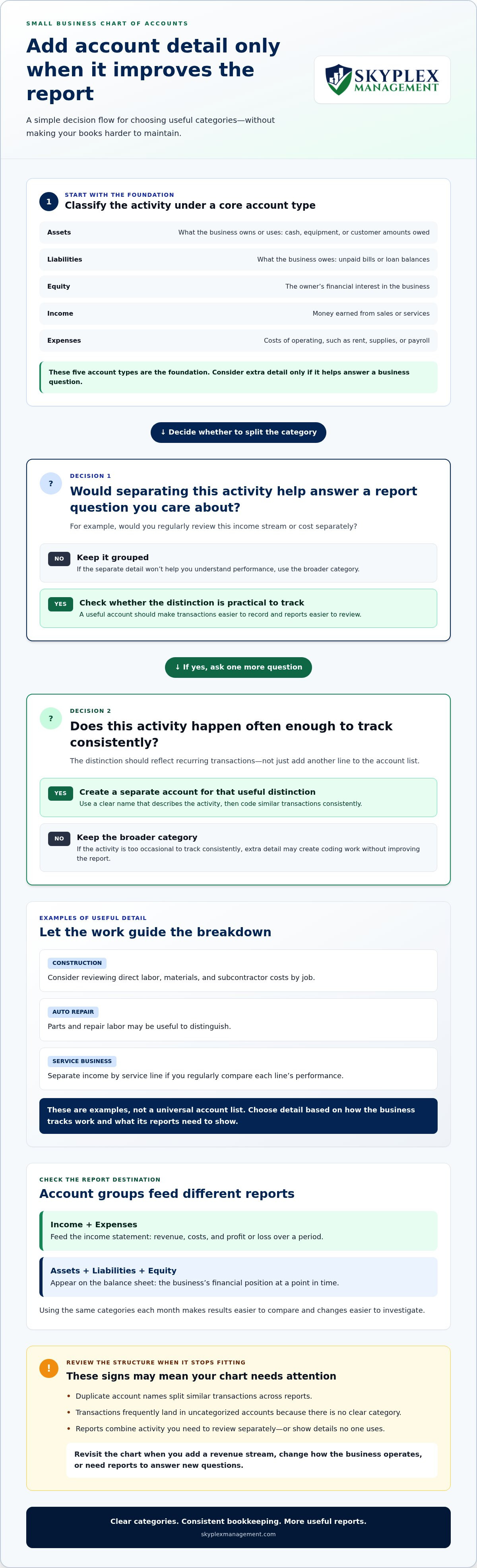
Accounts classify activity, while transactions preserve the detail. For example, a customer payment may be recorded as income, while the invoice and payment record show what was sold and when it was paid. Most small business accounts fall into five groups:
- Assets: resources the business owns or uses, such as cash, equipment, or amounts customers owe.
- Liabilities: amounts the business owes, such as unpaid bills or loan balances.
- Equity: the owner’s financial interest in the business.
- Income: money earned from sales or services.
- Expenses: costs of operating, such as rent, supplies, or payroll.
Income and expense accounts feed the income statement, which shows revenue, costs, and profit or loss over a period. Assets, liabilities, and equity appear on the balance sheet, which shows the business’s financial position at a point in time. Using the same categories each month helps you compare results consistently and spot changes worth investigating.
When a business should create or revisit its chart
Create a chart when starting a business, setting up accounting software, or organizing existing books. Revisit it when you add a revenue stream, change how the business operates, or need reports to answer new questions. A consultant and an auto repair shop may both earn income, but their recurring transactions and useful expense breakdowns can differ.
Watch for signs that the structure no longer fits:
- Duplicate accounts with slightly different names are splitting similar transactions across reports.
- Transactions frequently land in uncategorized accounts because there’s no clear category for them.
- Reports combine activity you need to review separately, or show details no one uses.
A template can be a starting point, but copying one built for another business may create confusion. A practical chart of accounts setup for small business reflects actual transactions and the questions owners need reports to answer. Consistent monthly bookkeeping helps keep those categories useful as activity changes.
Choose account categories that reflect how your small business operates
The five core account types provide a stable foundation. Build from there by asking which transactions happen regularly and which distinctions would help you understand performance. An account should make activity easier to record and reports easier to review, not simply add another line to the list. NetSuite’s overview of the structure and best practices for a chart of accounts also emphasizes tailoring accounts to a business’s needs.
Clear account names help everyone record similar transactions the same way and make reports easier to understand. Use familiar labels that describe the activity, and avoid creating multiple accounts for transactions that belong together.
Start with the five core account types
Use the categories to distinguish what the business has, owes, earns, and spends. Choose account names that match the way your company operates:
- Assets are resources the business owns or controls, such as its bank balance, equipment, or customer invoices awaiting payment.
- Liabilities are amounts the business owes, such as supplier bills or loan balances.
- Equity represents the owner’s interest in the business. Account names and structure may differ based on how the business is organized, so don’t assume one template fits every entity.
- Income records money earned from ordinary business activity, such as consulting work or repair services.
- Expenses capture costs of running the business, such as rent, software, supplies, or payroll.
Keep these foundational categories distinct from optional detail. If you rarely use a category or don’t review it separately, adding it may create more coding work without making reports more useful.
Tailor detail to the business’s actual activity
A service business might separate income by service line if owners regularly compare each line’s performance. Give other types of income separate accounts when the distinction is useful and transactions occur often enough to track consistently.
Industry needs differ. A construction company may want to review direct labor, materials, and subcontractor costs by job. An auto repair shop may find it useful to distinguish parts from repair labor. These examples aren’t a universal account list. The right structure depends on how the business tracks work and what its reports need to show. In QuickBooks Online, thoughtful setup and consistent bookkeeping help keep those categories meaningful.
An account name doesn’t determine the tax treatment of a transaction. If you’re unsure how to classify an item for tax or financial reporting, use relevant IRS guidance or get accounting advice before applying a category consistently. Skyplex Management provides bookkeeping and reporting support to help tailor account categories to your transactions. Learn more by contacting Skyplex Management.
How detailed should your chart of accounts be?
The right level of detail helps you understand the business without making routine bookkeeping harder. Broad categories keep the account list manageable, while useful subaccounts can reveal patterns hidden in a combined total. Too many categories can scatter similar transactions across reports and make results harder to interpret.
There’s no universal account count or template for every company. For a practical chart of accounts setup for small business, judge each category by whether it supports a recurring reporting or management question and whether transactions can be coded to it consistently.
| Approach | What it looks like | Best fit |
|---|---|---|
| Broad categories | One account groups similar costs, such as all office expenses. | Useful when the business needs a clear overview and doesn’t review those costs separately. |
| Useful subaccounts | A parent category is divided into meaningful groups, such as office supplies and software. | Helpful when owners regularly compare those costs or make different decisions about them. |
| Excessive detail | Small or infrequent purchases have their own accounts, or near-identical categories overlap. | Usually adds work without improving decisions, especially if transactions are coded inconsistently. |
When separate accounts improve visibility
Separate accounts are useful when they make a recurring business question easier to answer. For example, a service company may want to distinguish software subscriptions from office supplies if the owner reviews technology costs while planning operations. Separate categories make the income statement more informative when both totals matter. If the distinction rarely affects a decision, one broader account may be clearer.
Use names that tell the person entering a transaction where it belongs. “Software subscriptions” is clearer than “Other expenses,” and applying the label consistently keeps the totals useful. Before creating a category, ask: Will I review this amount separately, and can I reliably tell which transactions belong here?
When subaccounts and extra categories create clutter
Look for duplicate names, inconsistent labels, and accounts with little or no activity. A list containing “Meals,” “Business meals,” and “Client meals” may split similar spending across multiple lines without answering a distinct question. Excessive detail can also produce small balances that distract from larger operating trends.
Before adding categories to an established chart, review recent transactions and reports. Identify where activity is currently recorded, then decide whether a clearer category would solve a real reporting problem. Don’t create an account for every possible purchase in advance. A well-organized chart should be easy for the people handling the books to use, straightforward to review, and detailed enough to support the decisions you make.
Set up a small business chart of accounts in a clear sequence
A practical chart of accounts setup for small business starts with the information owners need from their reports, not a long list of account names. Work through the setup in order so each category has a purpose and the finished structure is easier to use in your accounting software.
Prepare the business information before creating accounts
Gather records that show how money moves through the business: current account categories, recent financial reports, transaction history, and recurring activities such as customer billing, payroll, supplier payments, and loan payments. If you’re starting from scratch, list activities you expect to record regularly. A Northeast Ohio contractor, for example, might track materials and subcontractor costs, while a local service business may focus on income by service line and regular operating expenses.
Write down the questions you want your reports to answer. Do you need to distinguish income from different services? Do you want to see job costs separately? Are payroll costs useful as one total, or does the business review different types of labor? Clear questions help you decide which categories are necessary before entering anything.
Build, test, and refine the structure
- Define reporting needs. Choose the business decisions and recurring reviews the reports should support.
- Review transactions. Look at existing activity and identify recurring income, costs, assets, and amounts owed. Note unclear or inconsistently categorized items for review rather than guessing.
- Organize categories. Start with the core account types, then add business-specific categories only when they answer a useful reporting question. Use clear names and a consistent naming pattern.
- Enter the structure. Add the approved categories to your accounting software. Keep this step focused on organizing accounts, and follow the current workflow in the platform you use.
- Test and review. Use representative transactions, such as a customer payment, supplier bill, payroll entry, or equipment purchase. Check that each transaction has a logical category and that the resulting reports are understandable.
Give opening balances particular care. These are the starting amounts entered for accounts such as bank accounts, loans, or other assets and liabilities. Compare them with reliable business records, and document questions or differences instead of forcing an unexplained amount into the books. When bringing over existing accounting data, review how the prior records map to the new categories before relying on the reports.
Skyplex Management provides QuickBooks Online support and cleanup to help organize account categories and historical records when a file has inconsistent entries or unclear balances. Reviewing the file before adding or changing accounts can make the setup more practical and help keep future bookkeeping consistent.
Keep the chart useful with consistent bookkeeping and reporting
Setting up the chart is only the beginning. As your business adds services, changes how it works, or starts asking new questions of its financial reports, the account structure may need review. The goal isn’t to change categories constantly. It’s to keep them aligned with real activity so consistent bookkeeping can produce useful reports.
Review account activity and reports on a regular cadence
Include a brief chart review in your regular bookkeeping routine. Look for uncategorized transactions, duplicate or overlapping accounts, and categories that no longer have a clear purpose. Then review the income statement and balance sheet for unexpected changes. A sudden shift in an expense total, for example, may reflect a real change in operations or transactions coded differently from earlier periods.
Investigate the pattern before changing the account structure. Check the underlying transactions and compare how similar activity was recorded in prior periods. Otherwise, moving or renaming accounts may hide a bookkeeping inconsistency instead of correcting its cause. For a closer look at what a balance sheet can tell you, refer to the Small Business Balance Sheet Analysis article.
Monthly bookkeeping keeps this review grounded in current, organized records. Consistent transaction coding makes it easier to compare profit-and-loss results over time, while properly maintained balance sheet accounts help you review assets, amounts owed, and owner’s equity. As reporting needs evolve, make deliberate updates and apply them consistently going forward.
Know when professional bookkeeping support can help
Consider additional support if records are routinely behind, similar transactions are categorized differently from month to month, or reports are too confusing to guide decisions. These are practical signs that the problem may involve more than the account list. Reliable reports also depend on reviewing transactions and maintaining accurate books throughout the year.
Skyplex Management provides monthly bookkeeping and financial reporting support for businesses across Northeast Ohio, including service-based companies, construction businesses, and auto repair shops. QuickBooks Online support helps organize existing files when account categories or historical records need attention. Payroll and outsourced controller services can support broader financial management needs.
For questions about tax reporting or classification, consult relevant IRS, SBA, or Ohio Department of Taxation guidance and confirm that it applies to your situation. These resources address different topics, so use the appropriate agency guidance rather than treating a chart of accounts as a substitute for tax advice.
A well-maintained chart of accounts setup for small business supports consistent records and clearer financial reporting. Skyplex Management provides bookkeeping, reporting, and QuickBooks Online support to help businesses organize their accounting setup.
Make your financial information work harder
A useful chart of accounts is a starting point for better conversations about your business. As you review the numbers, consider what you want to understand next: where cash is being used, which activities are supporting growth, or what deserves closer attention. That perspective keeps your chart of accounts setup for small business connected to real decisions instead of treating it as a one-time software task.
If organizing accounts or interpreting reports is taking time away from running your business, bookkeeping and accounting support can bring more consistency to the process. Skyplex Management works with businesses across Northeast Ohio on bookkeeping, payroll, financial reporting, and QuickBooks Online setup, support, and historical data cleanup. The firm serves businesses in Cleveland, Akron, Medina, Strongsville, Brecksville, Hudson, Stow, Cuyahoga Falls, Fairlawn, Brunswick, Wadsworth, North Royalton, Canton, Wooster, Richfield, Macedonia, Broadview Heights, and Solon.
With clear records and practical guidance, you can approach financial reports with greater confidence and focus on what comes next for your business.
Frequently Asked Questions
What is a chart of accounts for a small business?
It’s the account list used to organize a business’s financial activity. Think of it as the set of labels behind your reports: each account gives a transaction a consistent place in the books. For example, if you want to compare revenue from two services, the account structure needs to make that distinction visible. The list is most useful when owners and bookkeepers understand what each account is for.
How many accounts should a small business have?
There’s no fixed number that works for every business. A practical test is whether the people entering transactions can choose the right account without guessing, and whether the owner can read the resulting report without combining or splitting totals manually. If either task is difficult, review the account names and purpose. The aim is a manageable structure that supports real decisions.
Should I use a standard chart of accounts template?
A template can be a useful starting point, but treat it as a draft rather than a finished setup. Before adopting it, compare the account names with the language your team uses for invoices, bills, and payroll records. Familiar labels can reduce coding confusion. Remove or adapt categories that don’t match your business so the template doesn’t become a second system people have to interpret.
Can I change my chart of accounts after setting it up?
Yes. For a change that affects reporting, record what changed, why it changed, and when the new approach begins. This gives anyone reviewing the books context for differences between reports from before and after the change. Before merging or renaming accounts, consider whether a manager still needs to see the older category separately for an earlier period or internal comparison.
What is the difference between a chart of accounts and a general ledger?
The chart of accounts names the accounts; the general ledger contains the activity posted to them. In practice, the chart helps answer, “Which account should this transaction use?” The ledger helps answer, “What entries make up this account’s balance?” This distinction can help narrow down a problem: if the category itself is unclear, review the chart; if a total looks unexpected, examine the ledger activity.
How often should a small business review its chart of accounts?
Review the account structure before relying on reports for an important decision, such as planning a new service or evaluating a change in operating costs. You don’t need to revise the chart every time a report looks different. First identify whether the change reflects real business activity or an inconsistency in how transactions were recorded. Keeping a short list of questions for the next bookkeeping review can make the check more focused.
Do I need a separate account for every business expense?
No. A separate account isn’t the only way to retain purchase detail. For a one-time equipment repair, for example, the supporting bill or transaction record can preserve the vendor and description without creating a permanent account just for that purchase. Create a separate category when the distinction is useful in ongoing reports, not simply because two receipts describe different items.
Can bookkeeping support help me keep my chart organized?
Yes. If you’re unsure how account choices affect your books or reports, bookkeeping support can help clarify the setup and keep records consistent. Skyplex Management provides bookkeeping, accounting, QuickBooks Online support, payroll, and financial reporting for businesses across Northeast Ohio, including Cleveland and Akron. Owners can get help addressing the bookkeeping or reporting issues that make their records difficult to use.
Disclaimer
The information provided in this article is for general educational purposes only and should not be considered accounting, tax, or legal advice. Every business is unique. Consult a qualified accounting professional before making financial or tax decisions. Contact Skyplex Management for guidance specific to your business.


