

Imagine you are sitting in your office in Medina or Cleveland, trying to wrap up your monthly reporting, only to find that your numbers don't add up. It's a common scenario where common QuickBooks Online mistakes like duplicate bank feeds or miscategorized expenses turn a simple afternoon task into a source of major anxiety. You aren't alone in feeling frustrated when accounting jargon like "reconciliation" feels more like a barrier than a tool for clarity. We know that as a business owner in Northeast Ohio, you'd rather spend your time serving clients in Akron or Strongsville than hunting down a stray ten-dollar entry.
We believe your financial data should be a reliable roadmap for growth, not a puzzle that keeps you up at night worrying about an IRS audit. This guide provides the exact steps to identify and resolve these errors, giving you the clean reports you need for a stress-free tax season. We will look at how to streamline your bookkeeping process and ensure your 2026 records are accurate, audit-ready, and reflective of your hard work. By the time you finish reading, you'll have a clear path to financial peace of mind and the professional clarity you deserve.
Key Takeaways
- Learn why relying solely on automation often leads to the "messy books" phenomenon and how to apply professional accounting logic to your data.
- Discover how to identify and resolve common QuickBooks Online mistakes like duplicate transactions and misaligned bank feed rules that distort your cash flow.
- Understand the risks of a cluttered Chart of Accounts and why separating personal expenses is critical for avoiding Ohio tax audit triggers.
- Follow a practical 5-step checklist to safely fix reconciliation errors without losing historical data or creating new discrepancies.
- Recognize the signs that your books require professional cleanup and how expert oversight can turn financial records into a strategic growth tool.
Why Small Business Owners Struggle with QuickBooks Online Mistakes
Many entrepreneurs in Cleveland and Akron start their journey with a subscription to the QuickBooks software package, believing the platform's automation will handle the heavy lifting of their accounting. It's a logical assumption. However, software is a tool, not a professional bookkeeper. While automation can sync transactions, it lacks the critical thinking required to distinguish between a deductible business expense and a personal draw. This misunderstanding often leads to common QuickBooks Online mistakes that quietly snowball over time. When automation replaces accounting logic, the result is the "Messy Books" phenomenon, where your balance sheet no longer reflects the reality of your bank account.
Small errors in January often turn into year-end cleanup nightmares. A single miscategorized transaction might seem trivial, but when it's part of an automated "rule" that runs for twelve months, it creates a significant discrepancy. These errors carry high costs, including missed tax deductions and potential red flags for the IRS or the Ohio Department of Taxation. If you don't address these common QuickBooks Online mistakes early, you're making critical cash flow decisions based on flawed information, which can hinder the growth of your business in Medina or Strongsville.
The Difference Between Data Entry and Bookkeeping
There is a vital distinction between clicking "Add" on a bank feed and performing a true reconciliation. Data entry is the act of recording transactions; bookkeeping is the process of verifying that every entry is accurate, categorized correctly, and supported by documentation. Relying solely on AI-driven categorization rules is risky because the software doesn't understand the context of your specific industry. For example, a construction firm in Cuyahoga Falls has very different reporting needs than a retail shop in Hudson. Professional bookkeeping provides the oversight necessary to catch these technical slips before they impact your bottom line.
The Emotional Toll of Financial Disorganization
We often see business owners who feel a deep sense of anxiety as tax season approaches. This stress usually stems from the uncertainty of "messy" records and the fear of an audit. At Skyplex Management, we believe that clean books do more than just satisfy the IRS; they provide the peace of mind you need to focus on your strengths. Moving from a reactive state, where you're constantly fixing past errors, to a proactive state allows you to use your financial reports as a strategic advantage. When you know your numbers are right, you can lead your business with confidence and clarity.
Identifying Technical Errors: Duplicates and Bank Feed Mismatches
One of the most frequent technical hurdles we see at Skyplex Management involves the "Add" versus "Match" dilemma in the banking tab. It's easy to assume that clicking "Add" is the quickest way to clear your queue, but this simple action is a primary source of common QuickBooks Online mistakes. When you've already manually entered a bill or a check, clicking "Add" on the bank feed creates a second, identical entry. This effectively doubles your expenses or income, leading to a balance sheet that doesn't reflect your actual cash position. This Small Business Bookkeeping Guide highlights how fundamental accuracy is the bedrock of any successful firm, yet these technical slips often undermine that foundation.
Automation is designed to save time, but it can also replicate errors at scale. Bank feed rules are incredibly helpful until they aren't. If you've set a broad rule for a vendor like "Amazon" or "Target," the software might automatically categorize a personal lunch or a home office repair as a generic business expense. If your banking tab feels like a source of stress rather than a tool for clarity, you might benefit from a professional review of your current setup to ensure your data is working for you, not against you.
Managing the Undeposited Funds Account
Undeposited Funds is a temporary holding area for payments not yet taken to the bank. Many business owners in Cleveland and Akron find this account becomes a "black hole" where payments seem to disappear. If you record a payment on an invoice but don't group it into a bank deposit, it sits in this holding account indefinitely. This makes your income look correct on the Profit and Loss statement, but your bank balance on the Balance Sheet will never match your actual statement. To clear this out safely, follow these steps:
- Run a Balance Sheet report to see if the Undeposited Funds total looks unusually high compared to your actual pending deposits.
- Click the "+ New" button and select "Bank Deposit" to view a list of all payments waiting to be cleared.
- Identify old payments that have already hit your bank account and match them to the corresponding bank statement entry to remove them from the holding area without doubling your recorded income.
Auditing Your Bank Feed Rules
We recommend a quarterly audit of your bank feed rules to prevent future categorization errors. Rules can become outdated as your business evolves or as vendors change their transaction descriptions. One of the most common QuickBooks Online mistakes is checking the "Auto-add" box within a rule. This allows the software to bypass your review entirely, which can lead to months of incorrect data before you realize there's a problem. Unless you have a very simple, recurring transaction that never varies, it's safer to keep "Auto-add" turned off. For businesses in Medina or Strongsville looking to fix deep-seated rule errors, our QuickBooks Online Support & Cleanup service can help restore order to your automation settings.
Structural Blunders: Chart of Accounts and Categorization
The foundation of your financial reporting is the Chart of Accounts. When this structure is poorly designed, it leads to some of the most persistent common QuickBooks Online mistakes we encounter. Many business owners in Medina and Akron fall into the trap of creating too many sub-accounts or, conversely, dumping everything into a generic "Other Expense" category. This lack of organization turns your Profit and Loss statement into a cluttered list that provides no real insight into where your money is going. A clean, streamlined Chart of Accounts is essential for seeing the true health of your operations.
Another critical structural error is the commingling of personal and business expenses. This is the primary trigger for IRS audits in Ohio. When you use your business account for a personal trip to a Cleveland Guardians game or a grocery run in Strongsville, you're weakening your corporate veil and making tax season a nightmare. Similarly, misclassifying 1099 contractors as W2 employees is a costly payroll error that can result in significant back taxes and penalties from the Ohio Department of Taxation. These structural slips often happen because owners focus solely on the Profit and Loss statement while ignoring the Balance Sheet. If you aren't tracking your debt and equity properly, you might feel profitable even as your liabilities pile up unnoticed.
Industry-Specific Categorization Needs
Generic accounting settings rarely work for specialized industries. In construction accounting, for instance, failing to use job costing makes it impossible to know if a specific project in Canton was actually profitable. Auto repair shops in Cuyahoga Falls need precise tracking for parts inventory and labor to maintain healthy margins. Professional service firms in Brecksville must ensure billable hours and reimbursable expenses are captured accurately to avoid leaving money on the table. Each industry requires a tailored approach to categorization to ensure the data is actually useful for growth.
Ohio-Specific Tax Considerations
Operating in Northeast Ohio brings unique regulatory requirements that your software won't automatically handle. You must properly categorize your gross receipts to ensure you are compliant with the Ohio Commercial Activity Tax (CAT) thresholds. Additionally, navigating local municipal tax tracking for employees living in different jurisdictions like Akron or Richfield requires a meticulous payroll setup. If these complexities feel overwhelming, our Business Advisory Services can provide the professional oversight needed to keep your business compliant and your records audit-ready. We help you move beyond simple data entry to a structured system that supports long-term stability.
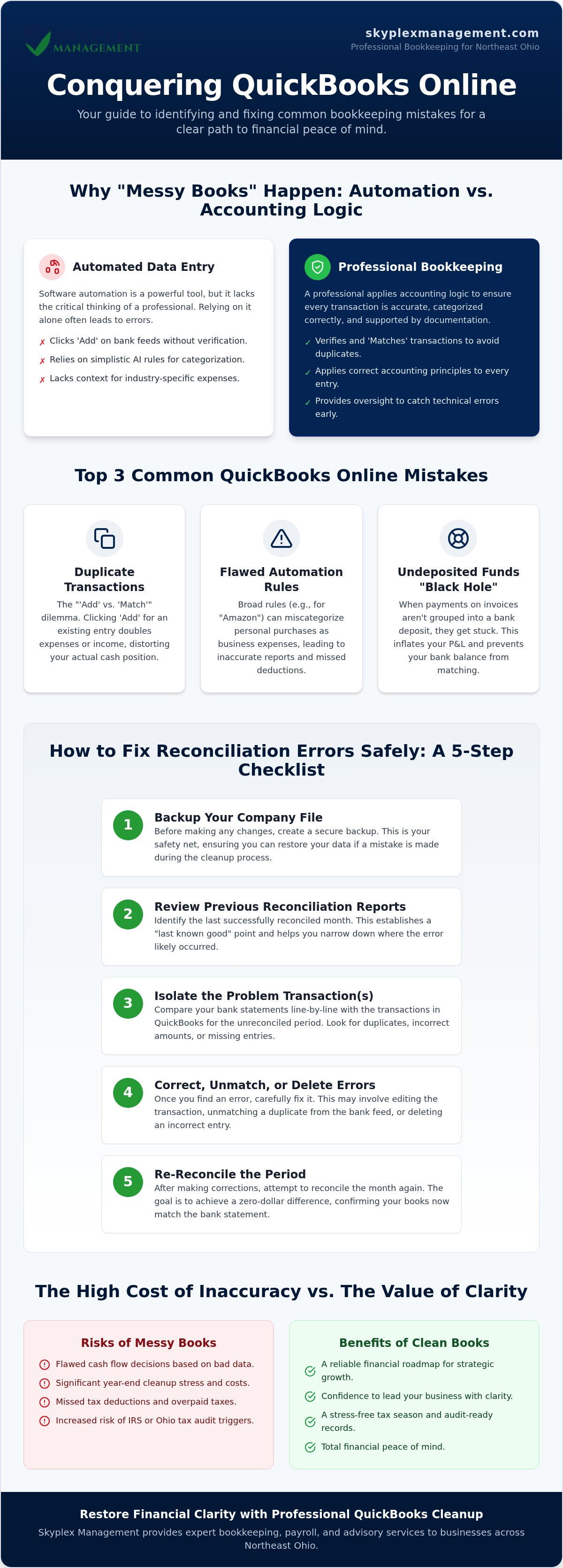
How to Fix QuickBooks Reconciliation Errors Safely: A 5-Step Checklist
Reconciliation is often the most daunting task for business owners in Akron or Medina. It's the moment of truth where your digital records meet the reality of your bank statement. Fixing common QuickBooks Online mistakes in this area is vital because a reconciled account is the only one you can truly trust for tax filings or loan applications. To fix these errors without making the "mess" worse, we recommend a methodical, safety-first approach.
- Step 1: Establish a 'Point of No Return' date. Before editing historical data, export your last successful reconciliation report. This acts as your baseline so you know exactly where the records were last accurate.
- Step 2: Identify the 'Discrepancy Amount'. Look at the reconciliation window in QuickBooks. The software will tell you the exact dollar amount that is off; knowing this number helps you hunt for specific transactions.
- Step 3: Hunt for duplicates or missing transactions. Many common QuickBooks Online mistakes stem from the duplicate bank feeds we discussed earlier. Look for entries that match your discrepancy amount exactly.
- Step 4: Use the 'Reconcile Discrepancy' report. This tool is a lifesaver. It specifically identifies transactions that were changed, deleted, or manually un-cleared after they were already reconciled.
- Step 5: Perform a 'Mini-Reconcile'. If you find a stray transaction from a previous month, you can reconcile just that single item to bring your beginning balance back into alignment without restarting the whole year.
Why Reconciliation is the 'Gold Standard' of Bookkeeping
A reconciled account provides the ultimate peace of mind because it proves that every penny has been accounted for. One major trap to avoid is the "Reconciliation Discrepancy" account. You should never just "force" a balance by letting QuickBooks create an adjustment entry. This is a temporary fix that hides underlying issues and can lead to major headaches during an audit. For those dealing with years of backlogged data, you can learn more about How to Fix Messy QuickBooks Records with Professional Reconciliation Services.
Common Reconciliation Red Flags
Reconciliation is the process of matching your QuickBooks balance to your actual bank statement to ensure every penny is accounted for. While performing this check, watch out for uncleared checks or deposits that are several years old. These are often duplicates or errors that were never properly deleted. Similarly, bank adjustments without supporting documentation are red flags that suggest your books aren't as clean as they should be. If you see these issues piling up in your Strongsville or Cleveland business records, it's time to dig deeper into your transaction history.
Professional QuickBooks Cleanup: Restoring Financial Clarity
Identifying common QuickBooks Online mistakes is the first step toward financial health, but fixing them often requires a level of technical depth that goes beyond a weekend DIY project. If your bank feeds are months behind or your "Undeposited Funds" account has become a multi-year mystery, professional cleanup is no longer just an option; it's a strategic necessity. We often see business owners in Cleveland and Akron reach a breaking point where "messy books" prevent them from applying for credit, securing a lease, or making confident hiring decisions. When you can't trust your numbers, you can't lead your business effectively.
At Skyplex Management, our approach focuses on historical data repair rather than simply starting a new file. While some online forums suggest "starting over" as a quick fix, this path causes you to lose years of valuable business intelligence. You lose the ability to track year-over-year growth or provide consistent records for a potential tax audit. We work to untangle the existing data, ensuring your past records are audit-ready while setting a clean foundation for the future. Moving from a state of cleanup to consistent monthly maintenance is what provides the long-term stability every growing business needs.
The Value of an Outsourced Controller
Once your books are restored to health, the goal is to keep them that way. Professional oversight from an Outsourced Accounting partner prevents common QuickBooks Online mistakes from creeping back into your workflow. This level of service goes beyond basic data entry; it provides you with high-level financial reporting that helps you understand your true margins. Whether you are managing a construction crew in Cuyahoga Falls or an auto repair shop in Canton, having an expert oversee your books allows you to scale your operations with confidence across Northeast Ohio, from Medina to Strongsville and beyond.
Next Steps for Your Business
Our "Peace of Mind" approach means you can finally stop worrying about the technicalities of your ledger and start focusing on your strengths as a leader. Having a seasoned professional in your corner ensures that your financial records are a tool for success rather than a source of stress. We act as your supportive partner, handling the background complexities so you can focus on growth. For a deeper look at how we build these strategic foundations, you can explore our insights on QuickBooks Online Consulting Services.
Moving Toward Financial Clarity and Growth
You now have the roadmap to move beyond the frustration of messy records. By identifying technical bank feed mismatches and cleaning up structural categorization blunders, you've taken the first steps toward a truly audit-ready business. Addressing these common QuickBooks Online mistakes isn't just about software; it's about building a foundation for accurate financial reporting and proactive advisory. Skyplex Management has been a dependable fixture in Northeast Ohio for nearly a decade, assisting business owners from Akron to Cleveland with tailored bookkeeping solutions.
Our team of specialized QuickBooks Online Cleanup experts is here to handle the background complexities so you can focus on your own strengths. We believe that clean books lead to genuine peace of mind and the freedom to scale your operations with confidence. Your journey toward a streamlined bookkeeping process starts with a single, intentional decision to prioritize your financial health.
We look forward to helping you achieve the clarity and stability your hard work deserves. Let's work together to make 2026 your most organized and successful year yet.
Frequently Asked Questions
Why does my QuickBooks balance not match my bank balance?
Your QuickBooks balance often differs from your actual bank balance because of uncleared checks, pending deposits, or duplicate entries. While the bank feed shows what has already cleared the bank, your register includes every transaction you've recorded, including those still in transit. Performing a monthly reconciliation is the most effective way to identify these discrepancies and ensure your records are accurate.
Can I undo a reconciliation in QuickBooks Online if I made a mistake?
You can undo a reconciliation, but the process is different for business owners than it is for accountants. Standard users must manually un-check each transaction in the register, which is a tedious and error-prone task. However, a QuickBooks ProAdvisor has access to a specific tool that can undo an entire period at once. It's often safer to have a professional handle this to avoid creating further imbalances in your historical data.
What is the most common QuickBooks mistake small business owners make?
The most frequent of all common QuickBooks Online mistakes is commingling personal and business expenses. Many owners in Cleveland and Akron use a single card for both business and personal purchases, which creates a significant mess during tax preparation. This habit makes it difficult to track your true profitability and can lead to major complications during an Ohio Department of Taxation audit.
How do I fix duplicate transactions in my QuickBooks bank feed?
You can fix duplicates by using the "Exclude" function within the banking tab. If a transaction has already been recorded manually, you should always "Match" it rather than clicking "Add." If you've accidentally added a duplicate already, you must find it in the "Categorized" tab, undo the action, and then exclude the transaction from the "For Review" queue to keep it out of your register.
Is it better to fix messy QuickBooks records or start a new file?
It is almost always better to fix your existing records than to start a completely new file. Starting over causes you to lose years of historical business intelligence that is essential for analyzing growth trends and satisfying IRS requirements. A professional cleanup preserves your data history while correcting the structural errors and "messy" accounts that are currently causing you stress.
How often should I reconcile my accounts in QuickBooks Online?
You should reconcile your bank and credit card accounts at least once a month. Regular reconciliation allows you to catch common QuickBooks Online mistakes before they snowball into year-end nightmares. This habit ensures your financial reports are always ready for a lender or a business advisory session, providing you with a clear and reliable picture of your current cash flow.
What should I do if I find a transaction from a prior year that is wrong?
You should consult with an accounting professional before changing any transactions from a prior year that has already been closed. Deleting or editing old entries can change your beginning balances and conflict with previously filed tax returns. A professional can help you make a proper adjustment that corrects the error without triggering red flags with the IRS or state authorities.
Do I need a professional to clean up my QuickBooks Online account?
You likely need professional help if your reconciliations never balance or if you've lost confidence in your financial reports. While small errors are manageable for some, compounding technical slips often require an expert's eye to untangle properly. Investing in a professional cleanup provides the clarity you need to stop reacting to bookkeeping problems and start focusing on scaling your business operations.
Disclaimer
The information provided in this article is for general educational purposes only and should not be considered accounting, tax, or legal advice. Every business is unique. Consult a qualified accounting professional before making financial or tax decisions. Contact Skyplex Management for guidance specific to your business.


