

What if the safest way to catch up your books is to stop trying to fix everything at once? When overdue records pile up, it’s hard to know which transactions are missing, whether old errors are affecting today’s reports, or how to keep up with payroll and other deadlines. Learning how to clean up a bookkeeping backlog starts with a clear assessment, not guesswork.
You can rebuild reliable records without losing sight of current finances. This guide explains how to identify overdue periods, gather and organize documents, reconcile accounts, and prioritize corrections so each step moves your books toward accuracy.
You’ll also learn when QuickBooks Online cleanup or outsourced accounting support can help, and how to establish a manageable monthly routine once the backlog is resolved. Skyplex Management supports small businesses across Northeast Ohio, including Cleveland, Akron, Medina, Strongsville, Brecksville, Hudson, Stow, Cuyahoga Falls, Fairlawn, Brunswick, Wadsworth, North Royalton, Canton, Wooster, Richfield, Macedonia, Broadview Heights, and Solon, with bookkeeping cleanup and ongoing financial reporting to help owners regain a clearer view of their business.
Key Takeaways
- How to clean up a bookkeeping backlog starts with defining which accounts, periods, and reports need attention.
- Gather available bank, credit card, loan, sales, expense, and payroll records before reviewing overdue transactions.
- Work through the books chronologically, reconciling accounts and resolving exceptions before relying on updated reports.
- Choose DIY cleanup or professional bookkeeping support based on the time required, record condition, transaction complexity, and your confidence in the results.
- Set a recurring monthly routine and assign responsibility for collecting records and resolving open questions before they build up.
What a Bookkeeping Backlog Means for a Small Business
A bookkeeping backlog is more than a few transactions waiting to be entered. It means transaction recording, account reconciliation, or financial reporting is overdue or incomplete. Reconciliation is the process of comparing your books with statements from your bank or credit card company to confirm that the recorded activity matches. The basic purpose of Bookkeeping is to maintain a consistent record of financial activity. A backlog makes that record incomplete or harder to rely on.
A few late entries may be straightforward to catch up if statements and supporting documents are available. A backlog spanning several periods often takes more work: check what was recorded, identify missing activity, and trace unexplained balances before relying on later reports. Treating both situations as quick data entry can leave errors in place.
Unreliable books make it harder to see how much cash is available, understand where expenses are going, or plan for upcoming business needs. For example, an expense recorded twice can make costs look higher than they are, while missing deposits can understate income. Bookkeeping cleanup restores usable records; it does not erase the gaps that made the records unreliable. Identify and resolve those gaps so the updated books can support everyday decisions.
How to Tell Whether Your Books Are Behind
Start with the records you have, then compare them with statements for the same periods. Look for signs that activity was missed, duplicated, or left unresolved:
- Bank or credit card accounts that haven’t been reconciled, or balances you can’t explain.
- Missing months, uncategorized transactions, or duplicate entries in the bookkeeping system.
- Incomplete reports or differences between your books and available bank, card, loan, or payroll statements.
One unexplained balance may point to a specific entry to investigate. Several warning signs across multiple months suggest a broader backlog that needs a defined review, not a few quick edits.
Why Northeast Ohio Owners Benefit from a Clear Starting Point
Consider a Cleveland-area service business preparing to replace equipment while covering payroll and routine expenses. If its books are behind, the owner may not know whether the cash balance reflects all recent payments or whether expenses are complete. A clear, reconciled starting point makes those operating decisions more grounded in the business’s actual records. Ongoing small business bookkeeping services can keep records current after the initial review and help prevent overdue work from building up again.
Before You Clean Up a Bookkeeping Backlog, Gather and Sort the Evidence
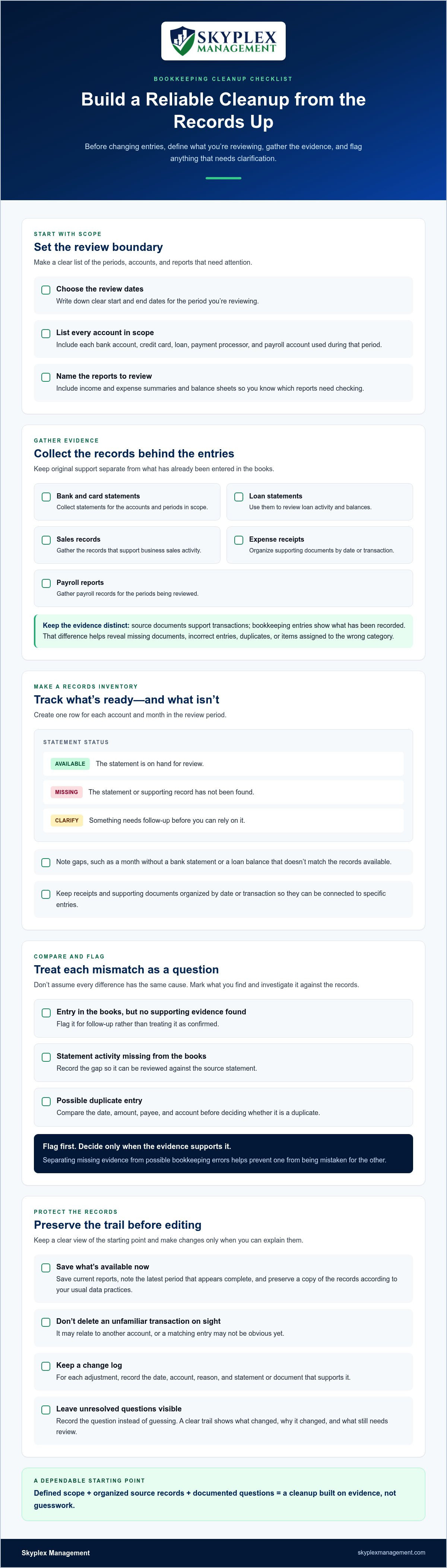
Before changing entries, define the period you’re reviewing and make a complete list of the accounts and reports involved. Set clear start and end dates, then identify each bank account, credit card, loan, payment processor, and payroll account used during that range. Include the reports you’ll need to review, such as income and expense summaries and balance sheets. This scope helps you track what’s ready, what’s missing, and what still needs investigation.
Collect the records that support activity in your books: bank and card statements, loan statements, sales records, expense receipts, and payroll reports. Keep source documents, which provide evidence of a transaction, separate from bookkeeping entries. That distinction helps you identify whether a document is missing or an existing entry may be incorrect, duplicated, or assigned to the wrong category. A resource such as Small Business Accounting Basics also underscores the role accurate records play in useful reporting.
Create a Records Inventory by Account and Month
Build a simple tracker with one row for each account and month in the review period. Mark every statement as available, missing, or needing clarification. Add a note for gaps, such as a month with no bank statement or a loan balance that doesn’t match the records you have. Organize receipts and other supporting documents by date or transaction so you can connect them to specific entries.
As you compare documents with the books, don’t assume every mismatch has the same cause. If a transaction appears in the bookkeeping system but you can’t find supporting evidence, flag it for follow-up. If a statement shows activity that’s absent from the books, flag that too. A transaction appearing twice may be a duplicate, but compare its date, amount, payee, and account before deciding. Marking these cases separately prevents missing evidence from being mistaken for a bookkeeping error, and vice versa.
Protect Existing Data Before Making Changes
Save the reports currently available and note the latest period that appears complete before editing historical entries. Preserve a copy of your records according to your usual data practices. Don’t delete a transaction solely because it looks unfamiliar or duplicated. It could relate to another account, or a matching entry may not be obvious at first glance. Record proposed adjustments and make them only when you can explain what the supporting evidence shows.
A short change log creates a useful trail. For each adjustment, note the date, account, reason, and statement or document that supports it. If a discrepancy remains unresolved, record the question instead of forcing a guess. This gives you and any bookkeeper reviewing the file a clear view of what changed and why. If missing records or uncertain entries make the inventory difficult to complete, talk with Skyplex Management about bookkeeping support before making changes that could affect later reconciliations.
How to Clean Up a Bookkeeping Backlog Step by Step
A reliable catch-up follows a sequence: establish the scope, use available records to verify activity, resolve differences, then review the resulting reports. Work through periods in chronological order. Earlier transactions affect later opening balances, so correcting a later month first can leave you chasing differences that began much earlier. A structured process makes it easier to see what’s resolved and what still needs attention.
- Define the scope. Confirm the first and last periods to review, the accounts involved, and which reports need to be brought up to date. Note known gaps or unusual balances so you can track them as you work.
- Collect records. Gather statements and supporting documents for the first period. Match transactions to source records such as receipts, sales records, loan statements, and payroll reports. Keep items that lack evidence or context on a separate follow-up list.
- Reconcile accounts. Compare recorded transactions with each account statement, one period at a time. Reconciliation is the process of comparing recorded activity with an account statement to identify and resolve differences. Don’t move forward while a balance difference remains unexplained.
- Resolve exceptions. Investigate missing entries, possible duplicates, transfers, and unfamiliar transactions before making changes. A transfer between two business accounts, for example, should be reflected in both accounts. Recording it as income or an expense can distort the reports. Flag unknown items rather than guessing at their purpose.
- Review reports. Once the accounts are reconciled and exceptions addressed, examine the reports for unexpected balances and changes. Trace unusual figures back to the transactions that created them before treating the period as complete.
Reconcile Accounts and Resolve Exceptions
For each period, compare statement activity with the books by date, amount, and payee or description. If an entry appears twice, confirm whether it’s a true duplicate or separate activity before removing anything. Investigate missing transactions and transfers across both affected accounts. For each material correction, document the reason and the supporting statement or record. This keeps the cleanup understandable and makes later review more dependable.
When differences involve complex QuickBooks entries or several periods, Skyplex Management’s QuickBooks Online support and cleanup can provide structured help tracing and resolving them.
Review Reports Before Calling the Backlog Complete
Review the profit and loss report, which summarizes income and expenses, alongside the balance sheet, which shows assets, liabilities, and equity. Compare periods and investigate movements that don’t make sense, such as an expense category changing sharply or an unexpected account balance. Trace each concern to the underlying entries, and use small business balance sheet analysis as a reference for reviewing the final report. If unresolved questions remain, keep them visible rather than treating the cleanup as finished. Skyplex Management can help owners discuss bookkeeping cleanup support when the work needs experienced oversight.
Should You Clean Up the Backlog Yourself or Get Bookkeeping Support?
Choosing how to clean up a bookkeeping backlog depends on more than how many entries are missing. Consider the time you can protect for the work, the condition of your records, the complexity of your transactions, and how confident you feel interpreting the results. Disorganized records are a starting point, not a reason to avoid cleanup. Choose an approach that lets you investigate gaps carefully without letting daily business responsibilities slide.
Bookkeeping software can organize transactions, import activity, and help match records. But software doesn’t independently confirm that every transaction is complete, belongs to the right account, or has been categorized correctly. Review still matters, especially if entries are duplicated, source documents are missing, or activity spans several periods.
Use these questions to weigh the options:
- Time: Can you set aside focused work sessions without delaying customer service, operations, or other responsibilities?
- Record condition: Are statements and supporting documents available, or will you need to track down missing evidence?
- Transaction complexity: Are entries straightforward, or do they involve transfers, loans, payroll, or unclear account balances?
- Confidence: Can you explain the numbers in your reports and the adjustments made to reach them?
When Owner-Led Cleanup May Be Manageable
Handling cleanup yourself may be practical when the overdue period is limited, statements are complete, and transactions are mostly familiar. Protect specific blocks of time for the review instead of fitting it between interruptions, and keep normal business work on the schedule too. Maintain a list of unresolved questions as you go. If a transaction’s purpose isn’t supported by the records, flag it rather than assigning a category based on a guess.
When Professional Cleanup Can Reduce Rework
Professional support can be useful when several periods are overdue, accounts remain unreconciled, payroll records need review, or transaction histories are difficult to interpret. Repeatedly changing entries without understanding their effect can create more work later. Skyplex Management provides small business bookkeeping, QuickBooks Online support and cleanup, payroll, and accounting services to organize historical records and connect cleanup with ongoing bookkeeping and financial reporting.
You don’t need perfectly organized files before getting help. The records you have, the periods that need attention, and the questions you can’t resolve are all useful starting information. A structured review can distinguish missing evidence from incorrect entries, document open issues, and establish a clearer basis for future bookkeeping. That can free you to focus on running the business while improving your confidence in the figures you use to make decisions.
After Cleanup, Keep Your Books Current with a Reliable Monthly Routine
Knowing how to clean up a bookkeeping backlog matters, but the lasting benefit comes from keeping the records current afterward. A monthly close is a repeatable review of the prior month’s financial activity. Assign someone to gather documents, review transactions, complete reconciliations, and prepare reports on a regular schedule. Clear ownership helps prevent unanswered questions or missing paperwork from quietly carrying into the next period.
Build a Repeatable Monthly Close
Choose a consistent point each month to collect statements, invoices, receipts, and payroll information. Keep those records in an organized, accessible location so the person handling the books can find them without searching through scattered messages and folders. Before relying on monthly reports, make sure account reconciliations are complete and unresolved transactions have been reviewed or clearly flagged.
- Assign responsibility for collecting and uploading records.
- Review account activity and reconcile statements against the books.
- Document open questions, identify who will resolve them, and follow up.
- Save reports and supporting documents together by period.
Keep the routine manageable. A short, consistent review is easier to sustain than waiting until several months of paperwork have accumulated. If a statement or receipt isn’t available, note the gap and follow up rather than letting it disappear from view.
Connect Cleanup to Ongoing Business Insight
Accurate, current bookkeeping gives financial reports a sounder foundation. Monthly bookkeeping keeps recorded activity up to date, while financial reporting and advisory support can help owners interpret results and connect them to operating decisions. The goal isn’t simply to produce reports. It’s to understand what the records show and identify questions worth addressing.
For example, a service business in Akron reviewing its monthly results might compare customer payments received with outstanding invoices and examine whether recorded operating costs align with its activity. Reliable records help the owner see what needs attention before making decisions about scheduling work, purchasing supplies, or managing upcoming expenses. The figures don’t make the decision, but they provide a clearer basis for it.
After cleanup, review the routine whenever responsibilities change or records repeatedly arrive late. A bookkeeper can help maintain the monthly process, and QuickBooks Online support can help keep the accounting file organized as the business’s activity continues. If maintaining the books alongside daily operations is becoming difficult, contact Skyplex Management about bookkeeping support to discuss a practical way to keep your records current.
Make Accurate Books Part of Your Next Chapter
A bookkeeping backlog can feel like a judgment on how you’ve managed the business. It isn’t. It’s a practical problem with a practical next step: decide what needs attention, then choose a cleanup approach you can sustain. You don’t have to solve every historical question before you begin. A clear starting point and a steady process can help you regain confidence in the records you use to run the business.
If you’re weighing how to clean up a bookkeeping backlog, Skyplex Management can help with QuickBooks Online setup, support, and historical cleanup, along with small business bookkeeping, payroll, financial reporting, and outsourced accounting. This support can turn catch-up work into a dependable foundation for the months ahead.
With organized records and a routine that fits your business, you can spend less time wondering whether the numbers are current and more time moving forward with clarity.
Frequently Asked Questions
How long does it take to clean up a bookkeeping backlog?
The time required depends on the amount of activity and how much investigation each period needs. To estimate the effort, review a representative account and month first. Note how many transactions need attention and how often supporting details are unclear. That sample can help you decide whether the remaining work fits your available capacity or would benefit from bookkeeping support.
Can I clean up a bookkeeping backlog while running my business?
Yes, if the cleanup has clear boundaries and doesn’t routinely displace essential work. Decide in advance which decisions need your attention, such as identifying an unfamiliar vendor, while assigning routine document gathering to someone familiar with the business. This keeps you involved in important judgment calls without requiring you to personally handle every administrative task. If questions keep interrupting operations, consider adding bookkeeping support.
What should I do first when my bookkeeping is months behind?
First, identify the last financial report you’re comfortable using and what decision depends on having more current information. Then check whether an unresolved difference could affect that decision before making a major adjustment. Avoid posting a balancing entry just to make a report look right. A note describing the uncertainty is more useful than an unsupported correction that hides the issue.
Can QuickBooks clean up a bookkeeping backlog automatically?
QuickBooks can assist with routine organization, but automation can’t supply context that was never entered. For example, two payments to the same vendor may look alike in a transaction list while relating to different purchases. Review suggested matches carefully, especially when amounts repeat or descriptions are vague. Treat automated categorization as a proposed shortcut, not proof that the underlying bookkeeping is complete.
What records do I need to catch up my bookkeeping?
Beyond account statements, look for records that explain what a transaction was for: customer invoices, vendor bills, purchase receipts with notes, and payment processor summaries showing fees or grouped payouts. These details can clarify why a deposit differs from a sale or whether a charge belongs to a particular business activity. For payroll entries, payroll registers can help connect recorded totals to the underlying pay periods.
Should I start over if my bookkeeping records are a mess?
Don’t assume a new file will solve the problem. Before deciding, determine whether the existing account list, transaction history, and previously issued reports still contain information the business needs. A fresh file can make historical activity harder to compare if older records are simply abandoned. If you can’t tell which information is reliable, a QuickBooks Online cleanup review can help assess the file before you choose a direction.
How can I prevent another bookkeeping backlog?
Make ownership visible: identify who handles routine bookkeeping tasks, who answers questions about unfamiliar transactions, and who reviews the finished reports. Keep a short list of open items with a named person responsible for each one, so unresolved questions don’t disappear between periods. For a Cleveland or Akron business, the process can be as simple as a shared task list and a recurring review appointment that fits the team’s workflow.
Disclaimer
The information provided in this article is for general educational purposes only and should not be considered accounting, tax, or legal advice. Every business is unique. Consult a qualified accounting professional before making financial or tax decisions. Contact Skyplex Management for guidance specific to your business.


