

Did you know that 40% of small business owners lose money every year simply because of bookkeeping errors? Whether you are running a construction crew in Akron or a repair shop in Cleveland, seeing a bank feed that doesn't match your register balance is more than a nuisance. It is a sign that your financial foundation is shifting. If you need to fix messy QuickBooks records, you aren't alone, and it isn't a reflection of your talent as a business owner. Most messy books happen because of workflow gaps, not a lack of effort.
It's frustrating to look at a Profit and Loss statement you can't trust or a pile of payments stuck in Undeposited Funds from months ago. We understand the weight of audit anxiety and the stress of year-end tax scrambles. This guide provides a clear path to restore your financial clarity and ensure your records are ready for tax season. You will learn how to systematically diagnose errors, reconcile accounts to the penny, and build a repeatable monthly routine. By the end, you will have the accurate reports needed to make informed decisions for your company's future in Northeast Ohio.
Key Takeaways
- Learn how to systematically triage your Balance Sheet to fix messy QuickBooks records without accidentally deleting valid data.
- Understand why your bank feed doesn't match your register balance so you can spot underlying workflow gaps before they disrupt your cash flow.
- Discover safe methods to clear out accumulated transactions inside your Undeposited Funds account to restore true financial clarity.
- Protect your business from overpaying taxes and ensure state compliance by eliminating duplicate entries and double-counted gross receipts.
- Establish a sustainable weekly and monthly bookkeeping routine that keeps your financial reporting accurate and ready for your CPA.
Warning Signs Your QuickBooks Records Are Messy (And How It Happens)
Opening your QuickBooks dashboard to find a sea of red flags or confusing balances can feel overwhelming. You have worked hard to build your business in communities like Brecksville or Hudson, and seeing financial data that doesn't reflect reality is a major source of stress. It's a common scenario, and it usually stems from how the software interacts with your daily workflows. If you need to fix messy QuickBooks records, the first step is recognizing that these errors are often systemic, not just random mistakes. To fix messy QuickBooks records permanently, you must address these workflow gaps rather than just deleting entries.
One of the loudest warning signs is a discrepancy between your actual bank balance and your QuickBooks register balance. When these numbers don't match, it signals that transactions are either missing, duplicated, or improperly categorized. Reliable Bookkeeping ensures these two figures align perfectly, but automated features often get in the way. If your balance sheet shows a negative cash balance while your bank account is actually in the black, you're likely dealing with unrecorded transfers or duplicated expenses that have corrupted your ledger. These issues aren't just software glitches; they are critical indicators that your financial reporting is no longer reliable for decision-making.
The Disconnected Bank Feed and Duplicate Entry Trap
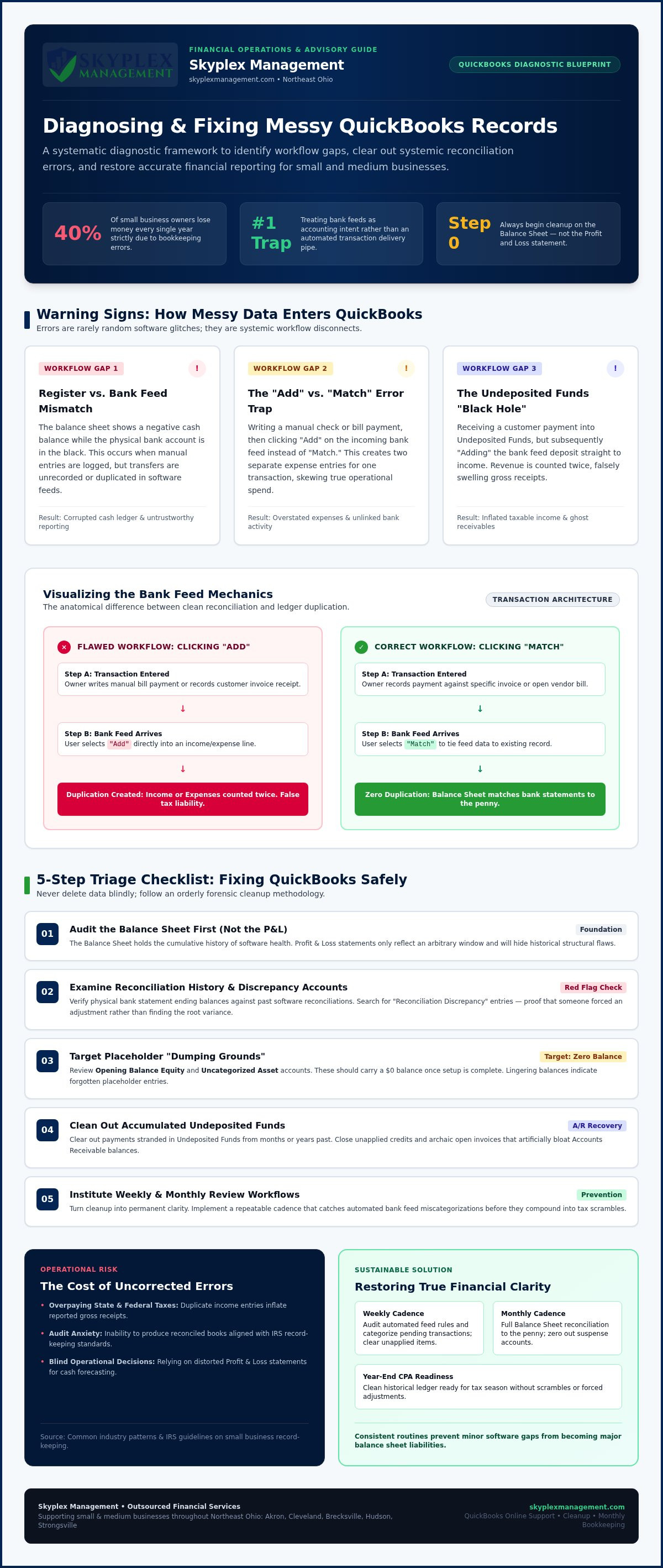
QuickBooks bank feeds are helpful, but they are just a data delivery system. They don't automatically know your accounting intent. A frequent trap occurs when an owner writes a manual check or records a bill payment, then clicks "Add" on the bank feed instead of "Match." This creates two separate entries for one expense. Automated rules can make this worse, silently categorizing hundreds of transactions incorrectly without a human ever reviewing them. This is a primary reason why business owners in Strongsville and Akron seek professional QuickBooks Online Support & Cleanup to untangle their transaction history.
The Black Hole of Undeposited Funds and Unapplied Payments
The Undeposited Funds account is another common area where records fall apart. It's intended to be a temporary holding spot for payments before they are taken to the bank. However, if you record a customer payment there but then "Add" the bank deposit directly to an income account, you've just double-counted your revenue. This leads to inflated tax liabilities and confusion. You might also notice unapplied credits or open invoices from years ago that were never properly closed out, creating a "black hole" that makes your accounts receivable look much larger than it actually is. Addressing these lingering items is essential for restoring financial clarity.
A 5-Step Diagnostic Checklist to Triage Messy QuickBooks Data
Before you begin changing transactions or deleting entries, you need an orderly triage process. Guessing your way through a cleanup often creates new errors that are even harder to unravel. Pinpointing exact error locations prevents destructive trial-and-error changes and gives you a clear roadmap. To systematically fix messy QuickBooks records, you must start with your Balance Sheet rather than your Profit and Loss statement, as your balance sheet holds the cumulative history of your software's health. Aligning your ledger with official IRS guidelines on record-keeping protects your business and ensures long-term compliance.
Reviewing specific accounting schedules reveals hidden dumping grounds where unclassified entries accumulate. Look closely at your Opening Balance Equity and Uncategorized Asset accounts; these should typically carry a zero balance once your system is fully set up. If you find large balances lingering there, it means transactions were placed there as placeholders and forgotten. Documenting all these discrepancies systematically before starting any transactional edits ensures you don't lose track of your progress.
Step 1 & 2: Audit Balance Sheet Health and Reconciliation Histories
Begin by checking if your bank and credit card accounts show past successful reconciliations. Look for "Reconciliation Discrepancy" accounts on your balance sheet, which indicate that someone forced a balance adjustment in the past rather than finding the actual error. You must verify that your physical bank statement ending balances match your historical software reconciliations exactly. If you spot persistent negative asset or liability balances, such as a negative credit card balance when you owe money, it requires a deeper historical investigation into your payment workflows.
Step 3, 4 & 5: Review Accounts Receivable, Payable, and Equity
Next, pull your Open Invoices and Unpaid Bills reporting schedules to review your sub-ledgers. You will often identify aging customer invoices that were actually paid, but the payment was recorded outside the formal software workflow, leaving the invoice open. Scan your vendor balances for unapplied credits and duplicate outstanding bill records that artificially inflate your liabilities. Finally, examine Owner Draw and Opening Balance Equity accounts for unclassified personal expenses or capital injections. If this diagnostic process reveals widespread discrepancies across multiple years, you can reach out to our cleanup team for a methodical ledger forensic review.
How to Fix the Most Common QuickBooks Errors Step-by-Step
Resolving ledger discrepancies requires a methodical approach to ensure you don't overwrite valid historical data. When you set out to fix messy QuickBooks records, you must understand the mechanics of each correction. Deleting historical transactions can alter previously filed tax return data, creating compliance risks with state and federal authorities. Following an established Small Business Bookkeeping Guide helps protect your transactional integrity. The table below outlines how to address frequent errors with proven corrective actions before moving into advanced software modules.
| Common Error Symptom | Root Cause | Proven Corrective Action |
|---|---|---|
| Stale Undeposited Funds balance | Deposits added directly from the bank feed instead of matching customer payments. | Use the Bank Deposit module to match uncleared payments against past bank deposits. |
| Duplicated expenses or revenue | Clicking "Add" on bank feed items that already exist as manual checks or invoices. | Undo incorrect entries to the "For Review" tab and match them properly. |
| Reconciliation breaks or variances | Altering or deleting a previously reconciled transaction in a closed period. | Locate the change via the Audit Log and restore the original transaction details. |
Clearing Out Years of Stale Undeposited Funds
To safely clear out accumulated transactions inside Undeposited Funds, navigate to the Bank Deposit module to inspect all uncleared payment transactions. You will likely find dozens of payments from prior months that were already deposited in the bank but never linked in the software. You must match these historical deposits against the lump-sum bank deposits shown on your past account statements. When dealing with duplicate records where income was already reported, use zero-dollar clearing journal entries cautiously to remove the duplicates without inflating your revenue. Always add a clear description to these clearing accounts to document the adjustment for your tax preparer.
Untangling Bank Feeds and Removing Duplicate Transactions
Cleaning up your banking tabs requires distinguishing between excluding an unneeded downloaded feed item and deleting an officially recorded transaction. If a transaction was downloaded twice by a software glitch, you can safely exclude it from the feed. For incorrectly added bank transactions that have already entered your ledger, you must undo them to send them back to the "For Review" feed tab. Once back in the feed, you can re-establish correct matching to your open customer invoices or previously entered manual checks, which eliminates the duplicate expense records immediately.
Re-Reconciling Disrupted Past Periods Safely
When past periods break, locate unauthorized changes in reconciled transactions using the QuickBooks Audit Log to see exactly who altered the transaction and when. For complex variance resolution, utilizing specialized guidance on reconciliation discrepancy troubleshooting can help identify why your balances drifted. You must rebuild your reconciliation month-by-month sequentially rather than attempting multi-year jumps all at once. If these discrepancies alter closed prior-year reports, it is best to utilize professional bookkeeping services to avoid filing inaccurate tax returns.
The True Cost of Dirty Records: Tax Triggers, Regulations, and Industry Pitfalls
Disorganized financial records are more than a software headache; they are a significant liability that impacts your bottom line. When you don't take the time to fix messy QuickBooks records, you're often flying blind during critical business decisions. Beyond the internal confusion, inaccurate books destroy your eligibility for commercial lines of credit at local banks in Akron or Canton. Lenders require high-quality financial reporting to assess risk, and if your balance sheet is full of errors, your loan application will likely be rejected.
Tax Compliance Risks: IRS Audit Flags and Ohio Tax Filings
In Northeast Ohio, messy bookkeeping creates specific exposure to the Ohio Department of Taxation. If you have duplicate revenue entries, you'll likely overpay on your Ohio Commercial Activity Tax (CAT), which is based on gross receipts. Similarly, the Regional Income Tax Agency (RITA) requires precise reporting for municipal income taxes across communities like Brecksville and Strongsville. Discrepancies between your federal returns and local filings are a major red flag for auditors.
The IRS also looks for specific inconsistencies that signal poor record-keeping. Miscategorized personal expenses, incorrect owner draws, and 1099 compliance failures are high-priority audit triggers. A reconciled balance sheet acts as your first line of defense, providing a clear audit trail that proves the integrity of your reported income and deductions. Ensuring your records match bank statements is the only way to verify that every dollar is accounted for during an inquiry.
Industry-Specific Disasters: Construction and Auto Repair Trades
Specific industries face unique traps that can quickly spiral out of control. For construction firms in Medina or Cuyahoga Falls, messy job-costing and retainage tracking distort project profitability. If you can't see the true cost of labor and materials for each site, you might be losing money on contracts you thought were profitable. Inaccurate tracking also makes it impossible to manage the complex billing cycles common in the trades.
Auto repair shops encounter similar challenges with parts inventory, customer core charges, and labor tracking. When these items aren't recorded correctly, it creates cash flow leaks that are difficult to plug. In trade businesses, inaccurate books conceal these leaks until they become a crisis. Taking steps to fix messy QuickBooks records ensures your industry-specific workflows actually support your growth rather than undermining it.
Moving from Cleanup to Clarity: Establishing Sustainable Bookkeeping Workflows
Once you take the steps to fix messy QuickBooks records, the real goal is to ensure those errors never return. Software cleanup is a vital first step, but it is only half the battle. Without a recurring routine, your ledger will naturally drift back into disarray as new transactions flow in. Establishing a sustainable workflow transforms your software from a source of anxiety into a powerful tool for business growth. It is helpful to understand that the cost of a reactive crisis cleanup is almost always higher than the investment in a steady, professional routine. You can learn more about these variables by reviewing our guide on outsourced bookkeeping pricing considerations.
The Essential Monthly Bookkeeping Close Checklist
A reliable financial close cadence ensures that your data remains accurate throughout the year. Your team should follow a strict end-of-month schedule that includes reconciling all bank, credit card, and loan accounts to their physical statements. You should also set up closing date passwords in QuickBooks Online. This simple step locks historical records and prevents accidental changes to periods that have already been reconciled or filed for taxes. Your monthly routine should also include:
- A thorough review of Accounts Receivable aging to identify late customer payments.
- A scan of Accounts Payable obligations to ensure no vendor bills are overlooked or duplicated.
- The generation of Profit and Loss and Balance Sheet reports for a formal strategic review.
When to Partner with an Outsourced Accounting Professional
Many growing businesses in Northeast Ohio reach a point where the complexity of their records exceeds their internal staff capacity. If you find yourself spending more time troubleshooting software than serving your customers in Cleveland or Akron, it's time to consider professional oversight. Partnering with a local expert provides peace of mind, knowing that your financial foundation is being managed by someone who understands the specific regulatory landscape of Medina and surrounding areas. For businesses that require deeper insights, connecting clean books with strategic growth is often best achieved through outsourced controller solutions. If you're ready to move from financial confusion to total clarity, you can contact Skyplex Management for a consultation to discuss a tailored cleanup or ongoing support plan.
Transforming Software Anxiety Into Operational Freedom
Taking the time to fix messy QuickBooks records is the first step toward reclaiming control over your business's future. By systematically diagnosing balance sheet errors and establishing a strict monthly closing routine, you protect your company from local tax risks while building a clear path for strategic growth. Clean financials don't just ease your year-end stress; they provide the accurate insights you need to make confident daily decisions.
Skyplex Management brings nearly a decade of dedicated small business accounting experience to owners across Northeast Ohio, including Cleveland, Akron, and Medina. Our team offers specialized workflow knowledge spanning construction, automotive trades, and professional service sectors. We provide personalized, judgment-free financial catch-up and ongoing monthly bookkeeping services tailored to your unique operational needs.
You don't have to tackle ledger forensics alone, and a clean financial foundation is entirely within reach for your local business.
Frequently Asked Questions
Can I fix messy QuickBooks records myself, or do I need an expert?
You can certainly attempt basic cleanup if errors are limited to a few recent months, but complex historical issues usually require a professional. Expert intervention is recommended when discrepancies affect closed tax years or involve intricate accounts like Undeposited Funds. A professional provides the technical mastery needed to ensure your records align with IRS standards without creating new errors. Our team at Skyplex Management helps Northeast Ohio owners resolve these complexities with judgment-free support.
Why does my QuickBooks bank balance differ from my actual bank statement?
Discrepancies usually occur because transactions were recorded in the software but haven't cleared the bank, or vice versa. Duplicate entries from automated bank feeds are a frequent culprit. If you click "Add" instead of "Match" on a feed item that was already manually entered, your register balance will drift away from your statement. Regular reconciliations are the only way to identify these specific gaps and ensure your financial reports remain reliable for decision-making.
What is the Undeposited Funds account and why does it have an enormous balance?
Undeposited Funds is a temporary holding account for payments you've received but haven't yet taken to the bank. A massive balance usually means you've been recording bank deposits directly to an income account instead of linking them to these individual payments. This workflow error double-counts your revenue and makes your accounts receivable look artificially high. Clearing this account is a top priority to fix messy QuickBooks records and restore your true cash flow clarity.
Will deleting old duplicate transactions in QuickBooks affect my previous tax returns?
Yes, deleting or altering transactions in a period that has already been filed can change your reported income or expenses. This creates a mismatch between your software and your official tax filings, which is a significant audit risk. Instead of simple deletion, you should use adjusting journal entries or consult a professional to ensure your historical reports remain consistent with what was submitted to the IRS and the Ohio Department of Taxation.
How long does a typical historical QuickBooks cleanup take to complete?
The timeline depends on the volume of transactions and the number of years that require review. A small service business in Hudson might see a cleanup completed in a few weeks, while a complex construction firm in Akron with years of errors could take longer. The process involves a methodical diagnostic phase followed by systematic corrections. A professional assessment from Skyplex Management provides a clearer estimate based on your specific ledger health and transaction volume.
What happens if I enter an artificial journal entry to force my reconciliation to zero?
Forcing a reconciliation creates a "Reconciliation Discrepancy" entry that acts as a red flag for auditors. It hides the underlying error rather than fixing it, which means your financial reports remain inaccurate. These artificial adjustments make it impossible to trust your Profit and Loss statement for business decisions. It is always better to find the specific missing or duplicated transaction to ensure your books balance to the penny, providing you with genuine peace of mind.
How do messy bookkeeping records impact my Ohio state and local taxes?
Disorganized records often lead to overpaying the Ohio Commercial Activity Tax (CAT) due to double-counted revenue. You might also face issues with municipal filings through RITA if your local income isn't tracked accurately across communities like Brecksville or Strongsville. Accurate records ensure you only pay what you owe and protect you from penalties during a state audit. Skyplex Management helps Northeast Ohio businesses bridge the gap between software records and formal state tax compliance.
How can I prevent my QuickBooks Online account from getting messy again?
The best prevention is a repeatable monthly closing routine that includes reconciling all accounts and locking historical periods with a password. You should also refine your bank feed rules to ensure transactions are matched rather than blindly added. Many businesses in Cleveland and Medina find that ongoing monthly bookkeeping support provides the professional oversight needed to maintain clarity. Consistent habits prevent small errors from snowballing into a major project to fix messy QuickBooks records later.
Disclaimer
The information provided in this article is for general educational purposes only and should not be considered accounting, tax, or legal advice. Every business is unique. Consult a qualified accounting professional before making financial or tax decisions. Contact Skyplex Management for guidance specific to your business.


