

A QuickBooks migration isn’t successful just because the import finishes. It’s successful when your records still make sense afterward. If you’re unsure what will transfer or concerned that balances and reports could be off, that uncertainty is understandable. QuickBooks data migration support can help you plan the move and check the results instead of treating it like a simple copy-and-paste task.
The right approach depends on your current system, the records your business relies on, and the reports you need. Some information may require separate handling, so planning ahead can limit surprises and reduce pressure on your team.
This guide explains how to prepare for a migration, identify records to review, and verify the new QuickBooks file. You’ll learn why comparing reports such as the Profit and Loss and Balance Sheet matters, and how ongoing bookkeeping can keep your records useful after the move. Skyplex Management supports small businesses across Northeast Ohio with QuickBooks Online support, cleanup, bookkeeping, and financial reporting, helping owners bring more clarity to the transition.
Key Takeaways
- Identify the source system, accounting periods, business workflows, and historical records your new setup needs to support.
- Use QuickBooks data migration support to clarify what’s included, what may need separate handling, and how transferred information will be reviewed.
- Choose a migration approach based on file condition, complexity, staff capacity, integrations, and the need to access past transactions.
- Document the source records and confirm backup options for your specific setup before beginning the transfer.
- Ask how migration follow-up can connect with account cleanup, monthly bookkeeping, and financial reporting so the new file stays useful.
QuickBooks data migration support: what it covers and why accuracy matters
QuickBooks data migration support covers planning a transition, transferring accounting information into a new QuickBooks setup, and checking the results. Data migration describes the broader process of moving information between systems. For a business, a completed transfer is only one milestone. It doesn’t confirm that account balances, reconciliations, or reports are accurate.
A move might involve changing QuickBooks versions, switching from a desktop setup to QuickBooks Online, or reorganizing records to make bookkeeping and reporting more useful. The right approach depends on the source and destination systems, the condition of the records, and what the business needs to do next. Transfer options and the details retained can vary, so confirm current limitations with Intuit before choosing a method. Don’t assume every historical transaction, workflow, or feature will carry over unchanged.
Which business situations call for QuickBooks migration help?
A growing business may need a different accounting setup or a clearer way for its team and bookkeeper to access records. Preparing to move can also reveal incomplete entries, inconsistent categories, or account reconciliations that were never resolved. Address these issues in the migration plan because carrying them into a new file can make later reports harder to trust.
Consider an auto repair shop that relies on customer records and clear income and expense reporting. Its migration plan should identify which customer details and reporting categories are essential, then check whether the destination setup supports the shop’s bookkeeping workflow. A service business may place similar emphasis on customer history and consistent categories for reviewing revenue and expenses.
What should a successful migration deliver?
A successful migration should leave the business with a QuickBooks file that supports its agreed bookkeeping and reporting process, not simply a file that opens. The owner or bookkeeping team should be able to identify what transferred, what was checked, and which items still need review.
After the move, compare key reports, such as the Profit and Loss and Balance Sheet, with reports from the source system for the same period. Investigate differences rather than assuming they’re harmless. Confirm any claims about complete transaction history or feature parity against current Intuit guidance for the specific source, destination, and workflow. Skyplex Management provides QuickBooks Online support and account cleanup for small businesses, helping owners assess their records and ongoing bookkeeping needs.
Which QuickBooks records and workflows should move with your business?
Start with what the business needs to do in its new accounting setup, rather than setting a blanket goal to move everything. QuickBooks data migration support is most useful when the scope reflects the source file, destination, accounting periods, and decisions the owner needs to make. Before choosing a method, list the records and workflows that support monthly bookkeeping and financial reporting.
Create a migration inventory before selecting a method
Record the current QuickBooks version, destination system, connected tools, who needs access, and any known file issues. Then identify the information your team uses regularly:
- Core records: Customer and vendor lists, accounts, transactions, and balances.
- Reporting structure: Categories and any project, job, or service details used to understand business results.
- Workflows and supporting information: Attachments, payroll information, integrations, and custom processes that may need separate review.
For example, a construction business may rely on job-level reporting, while a service company may need customer records and categories that help it review revenue by service type. An auto repair shop may prioritize usable customer information and reports that help track business activity. In each case, document what the current workflow requires, then confirm whether the destination can support it. Don’t assume a field, integration, or custom process will transfer or work the same way after the move.
Decide how much historical detail the new file needs
Accessible transaction history can help answer questions about past activity, but moving older records without review may carry forward duplicates, inconsistent categories, or unresolved reconciliations. Identify which periods and details the owner and bookkeeper need to reference. Separate useful history from information that may be outdated or duplicated.
Before treating records as ready, note accounts that haven’t been reconciled and categories used inconsistently. Reconciliation means comparing an account’s records with an independent statement, such as a bank statement, and resolving differences. These issues may need cleanup before or after migration, depending on the plan and supported options. Skyplex Management offers small business accounting services that include QuickBooks Online support and cleanup.
Ask specifically how attachments, payroll details, integrations, and custom workflows will be handled. Transfer options depend on the source, destination, and business needs, so verify current data-transfer limits and behavior with Intuit. If you’re unsure which records to prioritize, contact Skyplex Management to discuss your accounting records and migration needs.
Compare QuickBooks migration approaches before choosing a path
The right migration approach depends on more than the destination software. Compare each option against the same practical questions: How complex is the file? Are balances and reconciliations reliable? How much staff time is available? Which integrations and workflows matter? How much historical detail must remain accessible?
| Approach | May fit when | Trade-off to consider |
|---|---|---|
| Self-managed | The file and workflows are straightforward, and someone on the team can prepare records and review results. | The business handles planning, troubleshooting, and verification using its available staff time and knowledge. |
| Guided support | The owner wants help assessing the source file, selecting a migration path, or checking the transferred information. | Clarify exactly what the support covers, including which records are reviewed and what may need separate handling. |
| Broader bookkeeping assistance | The migration is tied to account cleanup, ongoing bookkeeping, or a need for more useful financial reporting. | Agree on the migration scope and ongoing bookkeeping work separately so responsibilities are clear. |
These approaches don’t guarantee identical transfer results. Current Intuit tools, eligibility requirements, and migration limits can depend on the specific source and destination. Confirm them with Intuit before committing to a plan, and ask how unsupported workflows or records will be addressed.
When might an owner manage the migration internally?
An internal move may be reasonable when the file is relatively straightforward and a team member has time to prepare it and compare records afterward. Document the source file’s condition, key reports, and known issues before starting. Also confirm how the business will retain appropriate access to source records during transition planning. An internal process still needs review, so don’t assume every data type will transfer.
When is professional QuickBooks migration support worth considering?
Unreliable balances, unresolved reconciliations, inconsistent categories, multiple workflows, or limited staff capacity are reasons to consider professional help. A bookkeeping professional can connect migration decisions to the reports the owner needs after the move, rather than treating the transfer as a standalone task. If messy records are a concern, explore Skyplex Management’s small business bookkeeping and QuickBooks cleanup articles for related guidance.
When evaluating QuickBooks data migration support, ask which source and destination systems are supported, what validation is included, which records are excluded, and what follow-up is available. Clear answers help you choose an approach that fits your records, team capacity, and reporting needs.
Prepare, migrate, and verify QuickBooks data with a practical checklist
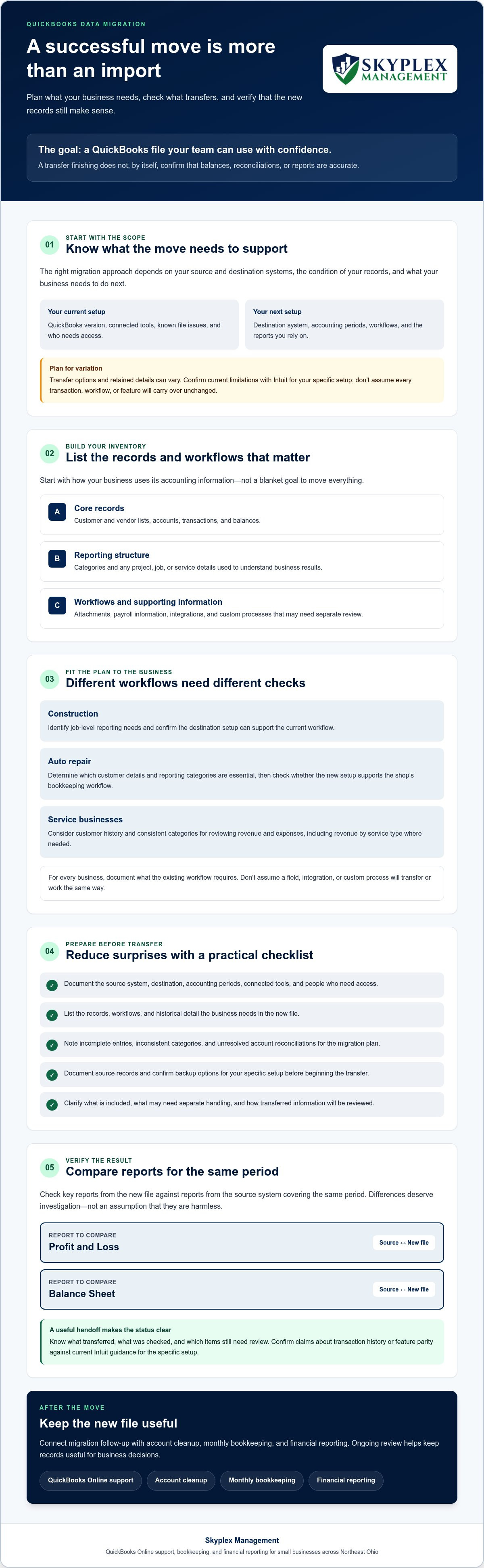
A migration plan works best when it gives your team a clear sequence and a way to compare the results. QuickBooks data migration support can help organize the process, but the business should still agree on what will be transferred, who will review it, and how unresolved items will be handled.
- Define the scope. Identify the source and destination, accounting periods, essential records, and workflows the new file needs to support. Decide which reports and balances will serve as comparison points.
- Prepare the source. Save or document source records and key reports before the transfer. Confirm what backup options are available for your specific QuickBooks setup, and note known issues such as incomplete reconciliations or duplicate entries.
- Select a method. Choose an approach that fits the file’s condition, your team’s capacity, and the records you need. Check current Intuit guidance for the specific source and destination, including available tools, eligibility, and migration limits.
- Transfer the agreed information. Follow the selected process and record any data or workflows that require separate handling. Don’t treat a completed import as proof that every record transferred as intended.
- Review and assign follow-up. Compare agreed reports and account balances using consistent dates and criteria. Investigate differences, document what remains unresolved, and assign someone to address each item before relying on affected reports.
Prepare the source file and migration plan
Before the move, capture starting balances, relevant reports, the accounting period covered, and known file issues. Review user access, connected integrations, payroll workflows, and information that may need separate review. For Northeast Ohio businesses, include the people responsible for bookkeeping and day-to-day operations in planning. They can flag practical needs, such as which reports support routine decisions and which workflows can’t be interrupted.
Review the destination file after transfer
Use the same report dates and criteria for source and destination comparisons. Review key account balances, customer and vendor records, transactions, and reconciliations included in the agreed scope. If a total differs, trace the discrepancy and record whether it needs correction, additional investigation, or separate handling. Keep a simple review log with the item, the finding, and the person responsible for follow-up.
Migration checks help assess record consistency, but they don’t establish tax or legal conclusions. For tax-related questions, consult current IRS or Ohio Department of Taxation guidance; seek appropriate professional advice for legal questions.
Get QuickBooks data migration support and dependable bookkeeping after the move
A provider should explain the migration scope and what happens after the transfer. Ask whether your specific source and destination are supported, which records and workflows are included, and what may need separate handling. Clarify how the provider will document the work, review the new file, and flag items that need follow-up. Also confirm who will oversee bookkeeping and reporting once your team begins using the new setup.
Questions to ask before engaging migration support
- Scope: Which records and workflows are included, and which may need separate handling?
- Review: How will the starting records and destination file be documented, and how will differences be communicated?
- Ongoing support: Who will manage bookkeeping, payroll, and financial reporting after the migration?
These questions set clear expectations and connect migration decisions to the practical work that follows. You’ll know who is responsible for keeping the records current and useful.
Turn a completed migration into clearer monthly books
Once the new file is in use, consistent bookkeeping and financial reporting can help owners follow business activity and make informed decisions. If the transition surfaces older discrepancies or records that need attention, account cleanup can be part of the ongoing plan. Businesses that want broader financial oversight can also consider outsourced accounting and controller services.
Skyplex Management serves small businesses across Northeast Ohio, including Cleveland, Akron, and Medina. Its services include QuickBooks Online support and cleanup, bookkeeping, financial reporting, Payroll Services, and Outsourced Accounting & Controller Services. If you’re considering ongoing monthly bookkeeping, explore the small business bookkeeping services information.
Discussing your source file and goals can help clarify which support fits your needs and what follow-up your records may require.
Move forward with confidence in your financial records
A sound QuickBooks migration starts with a clear plan for the records and workflows your business needs. QuickBooks data migration support can help you assess the transition, identify what needs separate handling, and check whether key balances and reports make sense in the new setup.
The work doesn’t end when the transfer is complete. QuickBooks Online support, historical data cleanup, ongoing bookkeeping, and financial reporting can help keep your records organized and useful as your business moves forward. Skyplex Management works with small businesses across Northeast Ohio to assess their accounting needs and support that ongoing work.
With a thoughtful plan and dependable bookkeeping, your new QuickBooks file can become a clearer foundation for managing the business.
Frequently Asked Questions
What does QuickBooks data migration support include?
QuickBooks data migration support can include assessing the source and destination, agreeing on scope, planning the transfer, and checking selected records and reports. It should also clarify exclusions and who handles follow-up. Skyplex Management offers QuickBooks Online support and cleanup, along with bookkeeping, accounting, and financial reporting. Its Northeast Ohio service area includes Cleveland, Akron, Medina, Strongsville, Brecksville, Hudson, Stow, Cuyahoga Falls, Fairlawn, Brunswick, Wadsworth, North Royalton, Canton, Wooster, Richfield, Macedonia, Broadview Heights, and Solon.
Can QuickBooks data be migrated to QuickBooks Online?
Yes, QuickBooks Desktop data can be moved to QuickBooks Online in eligible cases, but confirm current Intuit requirements for your source file and destination account. Intuit’s current guidance says the file must have fewer than 4,000,000 targets, and the receiving account must meet its subscription-age requirements. The applicable window differs for business owners and accountants. Check current eligibility and transfer options before choosing a method, since product requirements can change.
Will all of my QuickBooks history transfer during migration?
No, don’t assume every detail will transfer. Current Intuit guidance says that for files with more than 700,000 lines, lists and balances transfer, but individual transaction history does not. Budgets, memorized transactions, custom invoice templates, and some payroll records may also require separate setup. What carries over depends on the source, destination, and migration route, so confirm current limitations with Intuit and identify which historical records your business needs to access.
How do I check whether my QuickBooks data migrated correctly?
Compare the destination file with documented source records using matching dates and reporting criteria. Review account balances and key reports, then check customer, vendor, transaction, and reconciliation details included in the agreed scope. If totals differ, investigate and document the reason instead of assuming the import completed accurately. Keep a list of unresolved items and assign follow-up before using affected reports to make business decisions.
Should I clean up my QuickBooks file before migrating it?
Review the file before migrating, but whether to clean it up first depends on its condition and the migration plan. Look for duplicate entries, inconsistent categories, incomplete records, and unreconciled accounts. Moving these issues without a plan may make the new file harder to use and review. Discuss which items should be addressed before transfer and which can be handled afterward, and confirm how cleanup fits the agreed scope.
Can I migrate QuickBooks data myself, or should I hire a professional?
You may be able to manage a straightforward migration internally if someone on your team has time to prepare the records and verify the result. Professional help may be worth considering if balances are unreliable, workflows are complex, records need cleanup, or staff capacity is limited. Compare options based on file condition, historical access needs, connected tools, and who will handle bookkeeping and reporting after the move.
How much does QuickBooks data migration support cost?
The cost depends on the provider’s scope and the work required, including the source and destination, file condition, records and workflows involved, validation, and follow-up. There isn’t enough information to quote a price for your specific migration here. Ask providers to explain what’s included, what may require additional work, and how ongoing bookkeeping is handled. Request a written estimate based on your file and goals before deciding.
Disclaimer
The information provided in this article is for general educational purposes only and should not be considered accounting, tax, or legal advice. Every business is unique. Consult a qualified accounting professional before making financial or tax decisions. Contact Skyplex Management for guidance specific to your business.


