

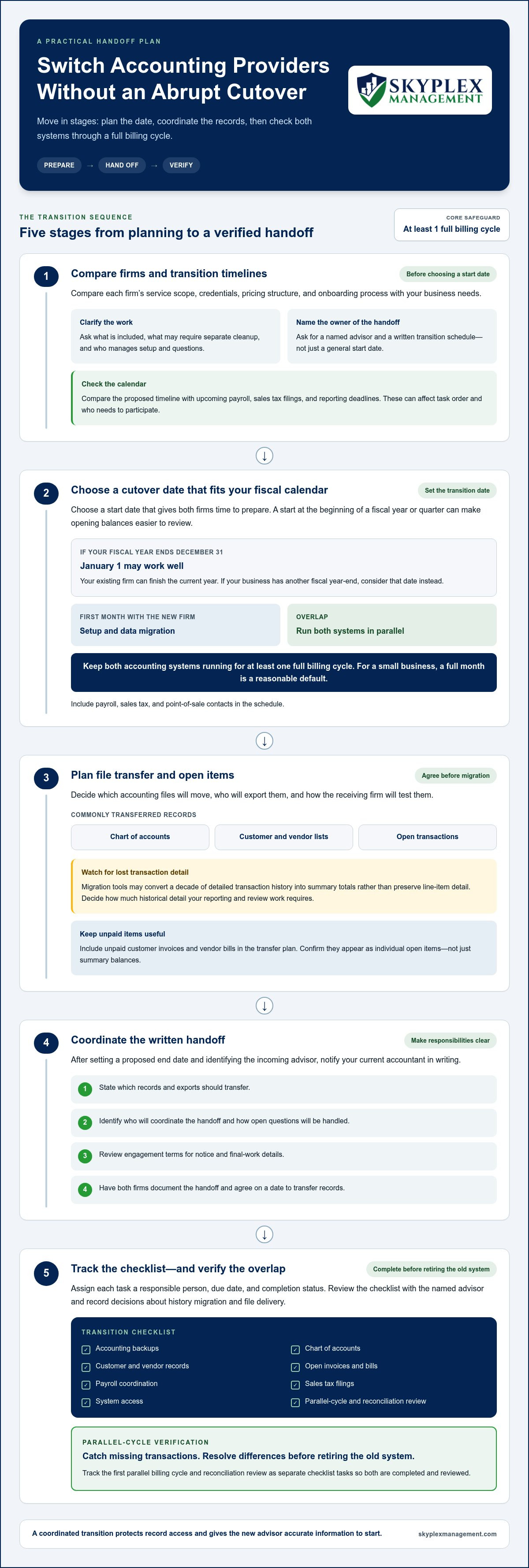
A smooth accounting transition needs an overlap, not an abrupt cutover. When planning how to switch accounting providers, run the old and new accounting systems in parallel for at least one full billing cycle. For a small business, a full month is a reasonable default. This gives you time to catch missing transactions and resolve differences before retiring the old system.
It’s understandable to want a clean break, especially if your current books need attention. A little coordination upfront can protect access to your records and help your new advisor start with accurate information.
This guide walks you through choosing a practical transition date, coordinating responsibilities, and securing your accounting files. You’ll also learn how to assess cleanup needs, transfer opening balances, and carry over unpaid invoices and bills individually. With a clear handoff plan, you can make the change in stages and keep day-to-day bookkeeping moving.
Key Takeaways
- Choose a transition date that aligns with your fiscal calendar, then map out the handoff tasks before the changeover.
- Agree with your new advisor on responsibilities, timing, and written communication so open questions have a clear path to resolution.
- Preserve access to your old accounting data and organize key records before making migration changes.
- Assess the condition of your books early so cleanup work and its scope are clear before ongoing bookkeeping begins.
- Transfer opening balances carefully and enter unpaid invoices and bills individually to keep customer and vendor records useful.
Planning the timing of an accounting-firm transition
Plan the handoff around your fiscal calendar, the condition of your books, and the work your team must complete. Use the steps below to set a date and avoid rushing data migration or open-item transfers.
-
Compare firms and transition timelines
Compare each firm’s service scope, credentials, pricing structure, and onboarding process with your business needs. Ask what work is included, what may require separate cleanup, and who will manage setup and questions. Certified public accountants are licensed by state boards of accountancy and hold a master’s degree. Ask for a named advisor and a written transition schedule, not just a general start date.
Compare the proposed timeline with upcoming payroll, sales tax filings, and reporting deadlines. These responsibilities can affect the order of migration tasks and who needs to participate.
-
Plan the cutover date
Choose a start date that gives both firms time to prepare. January 1 can work well when your fiscal year ends on Dec. 31, because your existing firm can finish the current year. Businesses with another fiscal year-end should consider that date instead; a cutover at the start of a fiscal year or quarter can make opening balances easier to review.
Allow the first month with the new firm for setup and data migration. Run both accounting systems in parallel for at least one full billing cycle. For a small business, a full month is a reasonable default. Include payroll, sales tax, and point-of-sale contacts in the schedule.
-
Transfer files and open items
Agree in advance on which accounting files will move, who will export them, and how the receiving firm will test them. Migration tools commonly transfer the chart of accounts, customer and vendor lists, and open transactions. They may convert a decade of detailed transaction history into summary totals rather than preserve line-item detail.
Decide how much historical detail your reporting and review work requires. Include unpaid customer invoices and vendor bills in the transfer plan, then confirm they appear as individual open items, not just summary balances.
-
Notify the current accountant
Notify your current accountant in writing after setting a proposed end date and identifying the incoming advisor. State which records and exports should transfer, who will coordinate the handoff, and how open questions will be handled. Review your engagement terms for notice and final-work details, so the relationship ends with clear responsibilities.
Ask both firms to document the handoff and agree on a date to transfer records. This keeps requests, file delivery, and follow-up from relying on informal conversations.
-
Build a transition checklist
List the cutover date, responsible person, due date, and completion status for each task. Include accounting backups, the chart of accounts, customer and vendor records, open invoices and bills, payroll coordination, sales tax filings, and system access. Track the first parallel billing cycle and reconciliation review as separate tasks.
Use the checklist in a handoff meeting with the named advisor. Record decisions about history migration and file delivery, then update the list as each item is completed.
Choosing a named advisor and communication process
Choose the person who will own your transition, not only the firm accepting your account. A named advisor gives your owners a clear contact for decisions, reporting questions, and follow-up during the handover. When planning how to switch accounting providers, treat this relationship as part of the operational setup, not an administrative detail.
- Match the advisor to your business. Ask who will lead the work, learn your accounting processes, and answer routine questions after onboarding. An accountant who has served your business for at least five years may understand its operations, capital expenditures, tax needs, and return on investment. Identify the knowledge that must carry forward, such as recurring expenses or management reporting preferences.
In your first meeting, describe how owners use financial reports. For example, a service business may need job-level revenue visibility, while a company with inventory may focus on purchasing and stock costs. Ask the prospective advisor to explain how their experience relates to your actual decisions. This gives you a concrete basis for evaluating whether their approach fits.
- Set a practical communication rhythm. Agree on one primary contact, the best channel for routine questions, and how to flag urgent issues. Set expectations for document requests and replies in writing, without assuming every issue needs a meeting. A short agenda for each check-in can cover unresolved questions, upcoming filing work, and decisions awaiting owner approval.
Keep the process accessible to staff who handle transactions. Introduce the advisor to the person managing payroll, sales records, or bill approvals, then clarify which questions go to which contact. For owners working out how to switch accounting providers, this simple routing plan helps prevent a payroll question from landing with someone focused only on monthly reporting.
- Choose software around current work and planned growth. List the systems your team uses for accounting, invoicing, payroll, payments, and point-of-sale activity. Identify the reports owners need and the manual steps that cause delays. Select software that supports those workflows as the business changes, rather than choosing solely for a familiar interface.
Before committing, map how transactions enter the books and who reviews them. If sales data comes from a separate platform, include its integration and reconciliation needs in the transition discussion. This map helps the advisor assess data movement and reporting continuity.
- Agree on the cut-off and cutover dates. The cut-off date marks the final transactions handled by the current advisor; the cutover date marks when the new advisor takes responsibility. Choose dates that create a clear boundary in the records and avoid splitting a reporting period unnecessarily. Starting at the beginning of a fiscal year or quarter can simplify comparisons and reporting.
Write down who handles transactions dated around the change, who reviews the first reports, and how questions reach the advisor. If you want help defining responsibilities and communication before the handoff, discuss your accounting transition plan.
Securing accounting software access and financial records
Secure a complete copy of your records before migration changes begin. Assign owners for filing dates, payroll deadlines, access, and testing so obligations stay visible during the handoff.
-
Collect tax, payroll, and workpaper records
Download the last three years of signed tax returns and gather payroll reports, prior filings, account reconciliations, and supporting workpapers. Include records that explain adjustments, such as loan schedules or fixed-asset details, so the incoming advisor can understand how balances were built.
Keep a due-date list with the records. Name the person responsible for each payroll run, tax filing, and payment, then identify which advisor handles it during the changeover. Use the existing filing calendar to assign responsibility; don’t rely on a general handoff date to cover every obligation.
-
Retain records that are not migrated
Before changing accounting software, reconcile the old system one final time and export a full backup. Save the backup securely alongside exported reports and source documents, with clear labels for the period and file contents. Migration tools may omit transaction detail, so preserve the original data even when summary balances appear correct.
Keep the old accounting data accessible for several years to support tax-record retention needs. The IRS advises businesses to retain records that support income, deductions, and credits. Don’t close access immediately after cutover. First reconcile the first full month in both systems, resolve differences, and confirm the new system contains the records your team needs.
-
Check record-keeping considerations
For U.S. businesses, distinguish company records from the advisor’s internal workpapers. Request copies of tax returns, payroll reports, accounting data, and supporting schedules, then identify any workpapers needed to understand adjustments. Put the request and file inventory in writing, and use the engagement terms to clarify transfer responsibilities and delivery arrangements.
Keep a copy of the request and a list of files received. Compare that inventory with the records needed for filing deadlines, payroll processing, and ongoing bookkeeping. This makes gaps visible while both advisors can still coordinate the handoff.
- Test the migration before retiring the old system. Compare sample records line by line with the source system before completing the cutover. Check transaction dates, payees, amounts, account assignments, and supporting detail, then investigate mismatches before relying on new reports.
Reconcile the first full month in both systems before retiring the old one. If organizing access, payroll records, and migration checks feels difficult, get help planning the accounting handoff.
Assessing bookkeeping cleanup and additional fees
Review the books before migration so cleanup work is visible, scoped, and separate from ongoing bookkeeping. The condition of reconciliations, account structure, and transaction detail determines the work required.
- Request a diagnostic review. Have the advisor inspect recent bank reconciliations, credit card accounts, balance sheet accounts, and the profit and loss report. Ask for specific examples of unresolved items, such as uncleared checks or uncategorized deposits. The review should distinguish routine monthly work from historical corrections, so you understand what must happen before reliable reporting begins.
Share the accounting file and supporting statements through an agreed secure process. Include payroll summaries and loan statements when they affect account balances. Missing source documents can slow cleanup because transactions may need investigation before correction.
- Identify reconciliation gaps and errors. List unreconciled periods, duplicate entries, negative balances, and transactions posted to suspense or uncategorized accounts. For example, a business with eighteen months of unreconciled bank transactions needs those periods reviewed before its ending cash balance can be trusted.
Separate known errors from items that need documentation. A personal purchase recorded as a business expense requires different treatment from a duplicated bank feed entry. This distinction helps define the actual cleanup work instead of treating every discrepancy alike.
- Review the chart of accounts and master data. Check whether the account structure supports the reports owners use. Merge duplicate accounts only after reviewing their history, and keep meaningful categories distinct. In QuickBooks, an overly broad expense account can hide useful trends, while duplicate customer or vendor records can complicate aging reports and payment tracking.
Also inspect customer names, vendor details, and inactive records. Correct inconsistent naming before data migration, but preserve transaction history needed for comparisons. Agree on the revised structure before changing account mappings.
- Choose what data to clean and migrate. List the periods, transactions, and supporting documents needed for ongoing reporting, tax preparation, and account review. Migration tools may summarize historical detail, so decide which source records should remain available outside the new system. Test representative transactions before applying account mappings across the full file.
Set priorities with the advisor: correct opening balances first, then resolve items affecting current reports. Avoid importing duplicate transactions or carrying old errors into a cleaner file. Record exclusions and the reasons for them in the migration plan.
- Get cleanup scope and pricing in writing. Cleanup price depends on unreconciled periods, transaction volume, missing records, payroll discrepancies, and chart-of-accounts changes; the price is given after a quote request. Ask the proposal to separate cleanup tasks from recurring services and identify deliverables, assumptions, and how newly discovered issues affect the scope.
Before work begins, confirm who will supply missing statements and approve adjustments. This keeps decisions documented and gives both sides a shared basis for tracking completed cleanup.
Loading opening balances and open items
Set a clear cutover date, then transfer balances and unpaid items from that same point in time. A careful comparison helps the new ledger reflect what the business owns, owes, and still needs to collect or pay.
- Prepare the cutover balance report. Ask the current advisor for a trial balance dated on the agreed cutover date. This report lists account balances and provides a starting point for the new ledger. Include bank accounts, credit cards, loans, fixed assets, accounts receivable, accounts payable, and equity. Compare each balance with supporting statements or schedules before importing it.
For example, match the bank balance to the statement covering the cutover date. Record any timing differences, such as a payment entered before it cleared the bank.
- Agree on account mapping before entry. Match each account in the old chart of accounts to its equivalent in the new system. A direct match may work for a standard checking account, while several old expense categories might map to one new category. Keep a mapping schedule with the old name, new name, balance, and reason for each change.
Review the schedule with the advisor before importing totals. This prevents an account from being omitted, duplicated, or assigned to the wrong category.
- Load open invoices individually. Enter each unpaid customer invoice in the new system, including its customer, invoice date, due date, and remaining amount. Don’t replace the invoice list with one lump-sum accounts receivable balance. Individual entries let owners see which customers owe money and help staff apply later payments to the correct invoice.
Compare the new accounts receivable aging report with the old report as of the cutover date. Investigate differences in customer balances, credit notes, and payments received but not yet applied.
- Enter unpaid bills and credits one by one. Carry each vendor bill into the new system with its vendor name, bill date, due date, and open amount. Include vendor credits that reduce what the business owes. A single accounts payable total may match the ledger, but it won’t show which supplier needs payment or when.
Compare the new payable detail with the old vendor report. Check partial payments and credits against source records before approving payments from the new system.
- Confirm the opening ledger and preserve the comparison. After entering balances and open items, compare the new trial balance with the cutover report. Reconcile accounts receivable and payable totals with their detailed aging reports. Document each adjustment, its supporting record, and who approved it.
Keep the old reports and mapping schedule with the transition records. That comparison gives the advisor a clear trail when a later report differs from the opening figures.
Skyplex Management: Small Business Bookkeeping
Skyplex Management supports small businesses in Cleveland and across Northeast Ohio with bookkeeping and accounting during a provider transition. Small Business Bookkeeping and Small Business Accounting help keep ongoing records organized, while QuickBooks Online Support & Cleanup can address file issues that affect reliable starting balances.
If payroll records and processing also need coordination during the handoff, Payroll Service can help keep that work aligned with the accounting records. Bring your transition date, current reports, open items, and unresolved questions to the conversation so the next steps are clear.
For practical support with your bookkeeping transition, contact Skyplex Management.
Make your next accounting relationship work for you
Changing providers can also be an opportunity to make accounting more useful to your business. Before the transition begins, decide what you want your financial information to help you understand, such as whether cash is available for a planned purchase or which services contribute most to revenue. Those priorities give your new advisor a practical starting point for conversations and reporting.
Knowing how to switch accounting providers is only part of building a better working relationship. Keep communication open after the handoff: share changes in your operations, raise questions when a report is unclear, and tell your advisor when your information needs change. Clear expectations on both sides help keep accounting support aligned with real business decisions.
If you’re ready to discuss support for your next step, reach out to Skyplex Management.
A thoughtful start can create a stronger foundation for the work ahead.
Frequently Asked Questions
Do you need to run both systems in parallel?
Yes, a parallel run helps reveal differences before the old system is retired. Keep both systems active for at least one full billing cycle, then compare recorded deposits, payments, and recurring charges. For example, confirm that a monthly software subscription appears once in each system, not twice or not at all. Use the comparison to resolve gaps while the source records remain accessible.
How do you know the switch has worked?
The transition is working when the new system supports regular bookkeeping without unexplained differences. Check that bank and credit card activity is recorded, customer and vendor balances make sense, and routine reports reflect the business’s activity. Also confirm staff can complete normal tasks, such as recording a customer payment or preparing a bill. Keep a short issue log so unresolved items have owners and follow-up dates.
How do you prepare your data before switching?
Start by organizing source documents into clearly labeled folders by account and reporting period. Separate bank statements, credit card statements, payroll summaries, tax filings, and supporting schedules. Identify duplicate customer or vendor names and flag transactions without clear descriptions. For example, label a deposit with its customer and invoice reference when available. This gives the incoming advisor context without requiring them to guess the transaction’s purpose.
How much history should you move to the new system?
Choose history based on the reports and comparisons your business needs. Migration tools may transfer a decade of granular transaction history as summary totals rather than line-item detail. If owners need prior-period comparisons, decide which detailed records matter before migration and retain source reports for reference. A contractor reviewing job performance, for example, may need job-level detail that a summarized opening balance won’t provide.
Should I transfer my old data across to the new system?
Transfer the data needed for current operations, opening balances, and meaningful reporting, but don’t assume every historical transaction belongs in the new file. Large volumes of old detail can bring duplicate names or outdated categories into the fresh structure. Preserve a complete backup and keep the prior system’s records accessible for several years. Then set the migration scope based on reporting needs and source-data quality.
What are the steps to switch accounting providers?
Set the transition date, name the responsible advisor, and agree on communication and task ownership. Next, organize records and software access, assess cleanup needs, and decide what history will migrate. Transfer opening balances and unpaid customer invoices and vendor bills, then compare key reports and transactions. Keep a record of open questions and decisions, such as who handles a payment received near cutover.
When is the best time to change accountants or bookkeeping firms?
A start at the beginning of a fiscal year or fiscal quarter can make reporting periods easier to separate. January 1 may suit businesses whose fiscal year ends on Dec. 31, while companies with another year-end can plan around their own calendar. Also consider payroll runs, filing work, and busy operating periods. The right date gives the team room to coordinate rather than dividing routine work without clear ownership.
What records and documents should I request from my current accounting provider?
Request signed tax returns for the last three years, accounting reports, reconciliations, and workpapers that explain significant balances or adjustments. Include payroll summaries, loan schedules, fixed-asset details, and reports showing unpaid customer invoices and vendor bills. Ask for a full accounting-file backup and an inventory of delivered files. Compare that inventory with your own records so missing periods or supporting documents can be identified while the former advisor can still clarify them.
Disclaimer
The information provided in this article is for general educational purposes only and should not be considered accounting, tax, or legal advice. Every business is unique. Consult a qualified accounting professional before making financial or tax decisions. Contact Skyplex Management for guidance specific to your business.


