

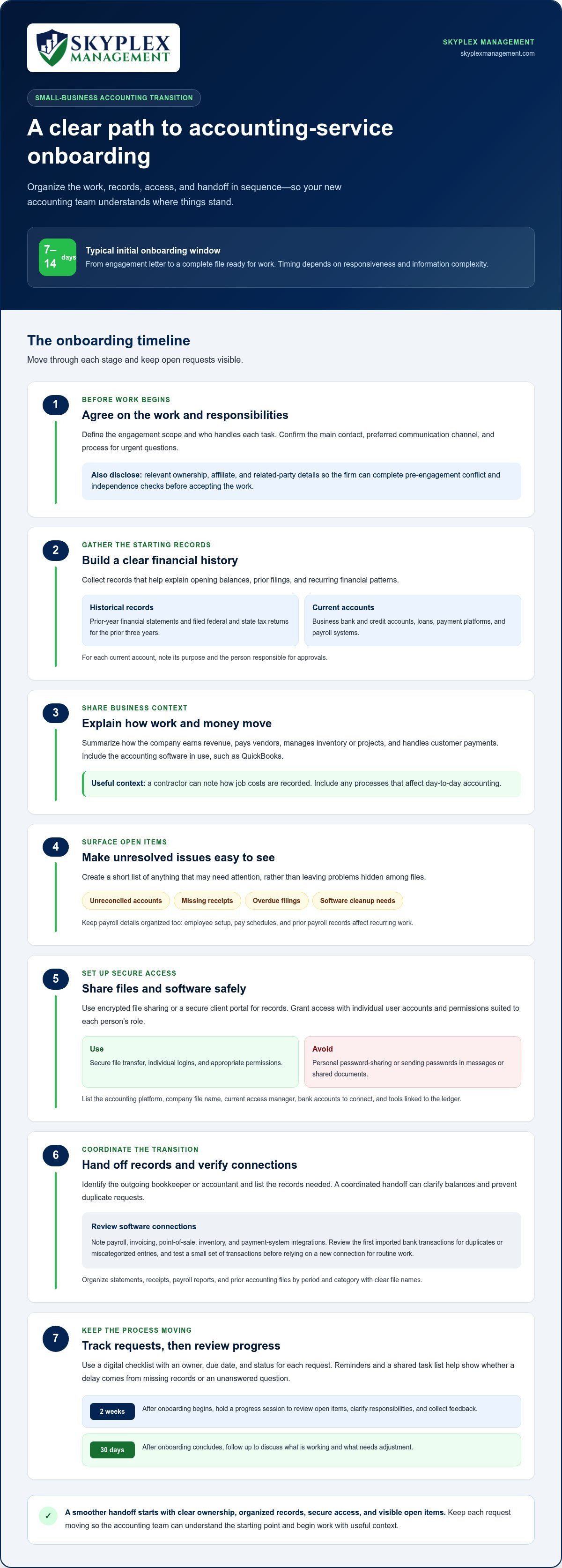
A smooth onboarding starts with a clear plan: agree on the work, share financial records and software access securely, and review how the business operates. For a typical small-business client, initial onboarding from engagement letter to a complete file ready for work takes 7-14 days, depending on responsiveness and information complexity. Good preparation helps keep the transition organized and gives your accounting team the context it needs to get started.
Expect to provide documents, system access, and background about your business when onboarding with a new accounting service. Gather these items early to reduce delays and help identify gaps in your records or processes before they disrupt ongoing work.
This guide explains how to plan onboarding with a new accounting service, prepare records, share QuickBooks Online and other software access securely, and help your accounting team understand the business. You’ll also learn what to clarify at the outset and which common missteps can slow the transition, so you can set expectations and make a smoother handoff.
Key Takeaways
- Agree on the work, responsibilities, and communication process before the transition begins.
- Organize financial records and business details so your new accounting team can understand the starting point.
- Share accounting software access and sensitive documents through secure methods, not personal password-sharing.
- Coordinate the handoff with your previous bookkeeper and explain the workflows that affect day-to-day accounting.
- Keep document requests moving and address bookkeeping, payroll, or software issues early to help onboarding stay on track.
Client onboarding checklist
What information and documents are needed to onboard with a new accounting service? Prepare prior-year financial statements, filed tax returns, account details, payroll records, and a clear description of your business operations. List the accounting software you use, such as QuickBooks, and flag any records or processes that need attention.
Before work begins, agree on the scope, responsibilities, and first deliverables. A checklist turns those decisions into specific tasks, making it clear what’s complete and what still needs attention.
- Define the engagement scope. List the bookkeeping, accounting, payroll, reporting, or other agreed work, and identify who handles each task.
- Set communication expectations. Choose the main contact, preferred channel, and process for urgent questions, so requests reach the right person.
- Gather historical records. Assemble prior-year financial statements and filed federal and state tax returns for the prior three years. These records help explain opening balances, prior filings, and recurring financial patterns.
- Prepare current account information. List business bank and credit accounts, loans, payment platforms, and payroll systems. Add the account purpose and the person responsible for approvals.
- Describe business operations. Summarize how the company earns revenue, pays vendors, manages inventory or projects, and handles customer payments. For example, a contractor can note how job costs are recorded.
- Flag unresolved items. Identify unreconciled accounts, missing receipts, overdue filings, or software cleanup needs. A short issue list helps prioritize work instead of leaving problems hidden in a folder.
- Arrange a prior-accountant handoff. Identify the outgoing bookkeeper or accountant and list records needed for the transfer. A coordinated handoff can clarify balances and prevent duplicate requests.
Payroll deserves a separate checklist because employee setup, pay schedules, and prior payroll records affect recurring work. Keep these items organized with the rest of the transition records, and review payroll service information when payroll administration is part of the engagement.
Before signing, the accounting firm should complete its pre-engagement conflict and independence checks. Share relevant ownership, affiliate, and related-party details so the firm can identify potential conflicts before accepting the work.
Use a digital onboarding checklist to assign each request an owner, due date, and status. Automated reminders can prompt follow-up, while a shared task list makes it easier to see whether a delay stems from missing records or an unanswered question.
Schedule a progress session two weeks after onboarding begins. Use it to review open items, clarify responsibilities, and collect feedback about the process. After onboarding concludes, plan a follow-up 30 days later to discuss what is working and what needs adjustment.
Accounting software access and secure document storage
When comparing accounting firms and online bookkeeping services, review their scope, communication process, software compatibility, and review procedures. Look beyond star ratings: ask how they handle bookkeeping questions, financial reports, and transition tasks to see whether their working style suits your business.
Transfer bookkeeping records using encrypted file sharing or a secure client portal, not an ordinary email attachment. Grant software access through individual user accounts with appropriate permissions, and never send passwords in messages or shared documents.
Prepare an access list before setup. Include your accounting software, business bank accounts, payroll system, payment platforms, and any tools that send financial data to the ledger. For QuickBooks, note the company file name and who currently manages access. The accounting team can then review what is connected and what still needs setup.
- Confirm the accounting platform. List whether you use QuickBooks, Xero, Sage, or another system, along with the version or plan when known. This helps identify features and file formats relevant to the transition.
- Review user permissions. Identify who can view, enter, approve, or change transactions. Give each person access suited to their role, rather than sharing one login across the business.
- Prepare bank-feed setup. List each account that should connect to the accounting software and identify the authorized account holder. Review the first imported transactions together to catch duplicate or miscategorized entries.
- Check integrations. Note links to payroll, invoicing, point-of-sale, inventory, or payment systems. A connection can reduce repeated entry, but poorly matched settings may create duplicate data or incomplete records.
- Organize documents. Group statements, receipts, payroll reports, and prior accounting files by period and category. Use clear file names, such as “Operating account statement, March,” to make retrieval easier.
Software features involve trade-offs. Bank feeds can reduce manual entry, but imported transactions still need review. Payroll or sales integrations can streamline posting, while mismatched accounts or categories can make reports harder to interpret. Test a small set of transactions before relying on a new connection for routine work.
Ask how financial records are encrypted during transfer and stored afterward. Agree on where final reports and supporting documents belong, who can access them, and how backup and recovery procedures work. A simple access map can list each system, its owner, and its approved users.
If software permissions, bank feeds, or file cleanup are holding up the transition, discuss your accounting setup and the access changes needed for a more orderly handoff.
Assessing a prospective client's business and prior accountant
Start by mapping how the business earns and spends money. Describe revenue sources, customer payment timing, vendor terms, payroll, inventory, projects, and related companies. For example, a service business may need job-level labor costs reviewed, while a retailer may need its inventory movements understood. These details help shape onboarding around actual operations.
Choose between a CPA, bookkeeper, and virtual accounting service based on the work you need. Bookkeepers maintain transaction records; accounting support may also include reporting and financial oversight. A CPA is a licensed professional, so match the role and engagement scope to your needs.
Use the initial meeting to discuss the prior accountant’s work, accounting software, and recurring questions. Ask which accounts are reconciled, how expenses are categorized, and which reports inform decisions. Review internal controls, including who approves payments and whether one person can both enter and approve transactions.
Switching services requires a documented handoff. Agree on a transition date, list the records and reports to transfer, and coordinate with the outgoing accountant. Then review opening balances and unfinished transactions before regular work begins.
- Clarify deliverables. Identify reports, bookkeeping tasks, payroll work, and meeting cadence included in the engagement.
- Set communication expectations. Name the primary contact, preferred channel, and process for escalating urgent questions.
- Define billing terms. Confirm how work is billed, what falls outside the agreed scope, and how additional work is approved.
- Map responsibilities. Record who supplies information, approves transactions, and reviews reports to prevent tasks from being overlooked.
For tax filing and compliance, document who prepares each return, who handles filing, and who tracks deadlines. Use relevant IRS and Ohio Department of Taxation calendars to identify dates that affect the business, then plan record handoffs around them. Don’t assume routine bookkeeping automatically includes tax-return preparation or every filing task.
Accounting software can organize document requests, assign tasks, record approvals, and flag outstanding items. A shared workflow helps the team track questions from the first meeting through initial reports. Set access for authorized users and define where completed work will be stored.
Before hiring an accountant, ask what the engagement covers, how reports are delivered, who reviews them, how prior records are handled, and how billing changes if your needs expand. Ask for a clear explanation of the workflow, not just a list of software features.
Accounting service fees vary with scope, transaction volume, payroll complexity, reporting needs, and cleanup work. The price depends on the specific engagement and is provided after a quote request.
After the first reporting cycle, schedule a follow-up meeting to discuss accuracy, usefulness, and open questions. Record feedback and adjust task assignments or expectations to help the next cycle run more smoothly.
Common onboarding mistakes
A signed engagement letter starts the accounting relationship, but it doesn’t complete the transition. Delays often arise when responsibilities, records, or access remain unclear. Use the checks below to catch avoidable problems before they affect regular bookkeeping and reporting.
- Confirm the scope in writing. Compare the signed engagement with the work you expect, such as monthly bookkeeping, payroll, or financial statements. A service that isn’t included can’t be assumed from a general agreement.
- Assign an owner to each request. Name the team member responsible for providing records, approving transactions, and answering questions. Without clear ownership, requests can sit unanswered while both sides assume someone else is handling them.
- Set realistic deadlines for records. If a document request is delayed, tell the accounting team what’s missing and when it will arrive. A 90-day onboarding can stretch to 150 days when requested documents are delayed.
- Identify unresolved accounting issues early. Flag unreconciled accounts, uncategorized transactions, or payroll questions instead of presenting incomplete records as final. Early disclosure helps the team plan the right review sequence.
- Keep the outgoing accountant in the loop. Agree on a transfer date and coordinate the handoff of ledgers, reports, and open questions. A missing closing balance can make the new period harder to reconcile.
- Clarify who handles each tax task. Record whether tax-return preparation, filing, and payment tracking are part of the engagement. Bookkeeping and tax filing are distinct tasks, so assumptions can leave responsibilities uncovered.
- Don’t rely on one contact alone. Establish a backup contact for approvals and document questions. If the primary contact is away during a critical transition task, a named backup can keep decisions moving.
- Review automated outputs. Check imported transactions and connected-system postings before treating them as complete. A bank-feed match or payroll entry can still land in the wrong account.
Common challenges include missing records, unclear approval steps, incompatible workflows, and limited staff time. For example, a business owner may need to approve vendor payments while also supplying receipts; separating those tasks can prevent a stalled handoff. A short weekly review of open requests helps identify the specific blocker.
Communication gaps can also create delays. Set a recurring check-in during the transition, keep one shared list of outstanding tasks, and note who owns each next step. When a deadline changes, record the revised date and reason, such as a delayed bank statement or payroll export.
Collect feedback after the first reporting cycle. Ask team members which requests were confusing and which approvals took the longest. Update the onboarding process with those examples so the next client relationship begins with clearer instructions and fewer repeat questions.
Outsourced accounting support during onboarding
Outsourced accounting onboarding should transfer knowledge, not just files. The accounting firm needs to understand how your internal team records transactions, approves payments, and uses financial reports. A clear, partner-led process connects that working knowledge to daily bookkeeping and reporting.
A typical outsourced accounting onboarding takes 4 to 6 weeks. The discovery phase takes 60-90 minutes, giving both sides time to discuss business operations, systems, reporting needs, and existing challenges. After discovery, the provider can shape the service around the work that needs to be done.
Use a staged transition so access, training, and live work don’t collide. A practical sequence looks like this:
- Discovery: Map current workflows, accounting software, approval steps, and reporting requirements.
- Service design: Define responsibilities, deliverables, communication, and how the accounting partner will coordinate with internal staff.
- Knowledge transfer: Explain business-specific processes, recurring transactions, and unresolved items. Training and knowledge transfer take 1-2 Weeks.
- Launch: Begin the agreed work, review early outputs, and resolve process gaps. The service launch and execution phase takes 2-4 Weeks.
During the first 90 days of the relationship, keep decisions and ownership visible. Assign an internal contact for approvals and questions, and ask the accounting firm to name a primary onboarding contact with a backup. Accounting firms should assign two staff members to support onboarding, one primary and another backup. That structure helps maintain continuity when one person is unavailable.
Keep security central to the handoff. Give each team member access suited to their responsibilities, use secure document-sharing methods, and agree where working papers and final reports will be stored. For example, staff who approve payments may need a different role from those who prepare reconciliations.
Set a review rhythm before the first deliverable arrives. During early reviews, compare account balances and transaction classifications with source records, then log questions and decisions. This gives both teams a shared record of changes instead of leaving guidance in informal messages.
Plan for the client’s time as well as the provider’s work. Identify an internal decision-maker, protect time for knowledge transfer, and respond to open questions promptly. A 90-day onboarding model works best when each phase has an owner, a clear outcome, and a review point.
After the transition, use a monthly, quarterly, and annual review schedule to discuss reports, changing business needs, and workflow improvements. The first 90 days of an accounting firm’s client relationship can determine whether a client stays or leaves, so treat feedback as part of the operating process, not a final courtesy.
Skyplex Management: Small Business Bookkeeping
Skyplex Management supports small businesses in Northeast Ohio with bookkeeping and accounting that fit their day-to-day needs. Business owners in Cleveland and nearby communities can turn to the team when they need organized records, clearer reporting, or help preparing for a change in accounting support.
Services include Small Business Bookkeeping, Small Business Accounting, QuickBooks Online Support & Cleanup, Payroll Service, Financial Reporting & Advisory, and Outsourced Accounting. Together, these services support routine bookkeeping, software cleanup, payroll processing, and financial reporting.
If you’re considering support for your business’s accounting needs, contact Skyplex Management to discuss the next step.
Set Up Your Next Accounting Chapter
Use the transition to establish a financial routine that supports better decisions. As you begin onboarding with a new accounting service, identify what you want to learn from your reports and which responsibilities you want to hand off. This gives the accounting relationship a clear purpose beyond simply moving records.
Skyplex Management provides Small Business Bookkeeping and Small Business Accounting to help maintain organized records and useful reporting. If your QuickBooks file needs attention before routine work can proceed, QuickBooks Online Support & Cleanup can help address that first.
A thoughtful start can make ongoing financial work easier to manage. Take the next step when you’re ready, with a clearer picture of what your business needs.
Frequently Asked Questions
Pre-Onboarding: How Can You Develop a Clear Plan?
Start by defining what a successful first reporting cycle should accomplish. Choose a transition date that fits your operating calendar, then identify decisions that need owner approval before routine work begins. For example, decide whether the new team should preserve existing account categories or recommend changes. Put the decision process in writing so staff know who can approve adjustments and how unresolved questions will be handled.
What are the key components of an accountant's onboarding checklist?
Beyond collecting information, make the checklist track dependencies and completion criteria. For example, don’t mark a software connection complete until a sample transaction has been reviewed and accepted. Include a decision log for accounting-method questions, an escalation path for blocked tasks, and a final signoff point for the transition. These checkpoints show whether the process is ready for regular work, not just whether tasks were marked done.
What is client onboarding?
Client onboarding is the initial working period in which an accounting relationship becomes an operating routine. It helps the business and accounting team establish how decisions are made, questions are resolved, and completed work is reviewed. For example, the owner may identify which figures matter most for weekly cash decisions. That context helps the team shape reports around how the business uses financial information.
What other Factors Should be Considered?
Consider how quickly the business can make decisions and whether staff are comfortable with remote workflows. A company with several approvers may need a clear way to resolve conflicting instructions. Also identify upcoming changes, such as a new location, ownership change, or shift in how customers pay. These can affect accounting procedures, so discussing them early helps prevent a new process from relying on outdated assumptions.
Why is structured onboarding important in accounting?
A structured process creates a baseline for judging whether the new arrangement is working. Agree on what a useful report should show, then compare the first completed reports with that expectation. If owners need a clearer view of project margins or cash needs, that goal can guide review discussions. This turns onboarding feedback into practical adjustments instead of letting concerns surface after the process becomes routine.
How long does accounting service onboarding typically take?
The timeline depends on the scope of work, the condition of existing records, system complexity, and how quickly decisions are made. A focused bookkeeping transition differs from a broader arrangement involving several systems and reporting needs. Track completed milestones, unresolved dependencies, and whether the team can consistently produce and review the agreed work to assess progress.
What are the risks of changing accountants midyear or near a tax deadline?
A change during an active reporting period can make comparisons harder if the outgoing and incoming teams use different categories or cutoff practices. Near a filing deadline, unresolved questions can also distract from assembling complete information. Agree on a clear division of work between the outgoing accountant, incoming team, and tax preparer, then review the first period’s reports for changes that could affect year-to-date comparisons.
Disclaimer
The information provided in this article is for general educational purposes only and should not be considered accounting, tax, or legal advice. Every business is unique. Consult a qualified accounting professional before making financial or tax decisions. Contact Skyplex Management for guidance specific to your business.


