

Payroll accuracy takes more than issuing paychecks. The responsibilities of a payroll service provider can include calculating wages, withholding taxes, making tax payments, filing returns, and maintaining payroll records. Even when a business outsources these tasks, the employer remains ultimately responsible for providing accurate information and paying federal tax liabilities.
It’s easy to assume that handing payroll to a provider means every detail will be handled automatically. In practice, accurate payroll depends on clearly assigned responsibilities and reliable information shared between the business and provider.
This article explains what a payroll service provider does, how wage calculations and tax filings typically work, and where errors can occur. You’ll also learn which responsibilities remain with the employer, so you can understand how payroll support can reduce administrative work while keeping oversight clear.
Key Takeaways
- Understand which payroll tasks a provider may handle, from wage calculations to tax filings and employee benefit deductions.
- See how accurate hours, pay rates, overtime, and deduction details support reliable pay runs.
- Keep in mind that outsourcing payroll doesn’t remove an employer’s responsibility for accurate information and federal tax liabilities.
- Learn how clear approval steps and payroll data checks can help catch errors before they affect pay or filings.
- Find out when bookkeeping and payroll support can make payroll records easier to manage alongside business finances.
What is a payroll service provider?
A payroll service provider handles some or all payroll tasks for a business, from calculating wages to preparing tax filings. The responsibilities of a payroll service provider depend on the agreed services, while the employer provides accurate employee and payroll information.
Outsourcing may cover payroll processing, payments, tax withholding, and recordkeeping. For example, a provider may calculate an employee’s pay and arrange a direct deposit, while the employer reviews the information used to calculate it.
Employee Self-Service Portals
An employee self-service portal is an online system where workers can view payroll information and manage certain account details. Depending on the provider, employees may access current and past pay stubs, W-2 forms, year-to-date earnings, or benefits information. This can reduce routine requests to a manager. For example, an employee can retrieve a pay stub directly instead of asking payroll staff to send another copy.
Employee Records and Absence Management
Payroll records organize employee details and pay information, while absence tracking records sick leave and holiday absences. A provider may also help register new employees and maintain payroll records for required retention periods. Accurate records connect an employee’s status and time away with the correct payroll calculation. If an absence affects reported hours, timely updates help prevent an incorrect payment.
Information Employers Provide
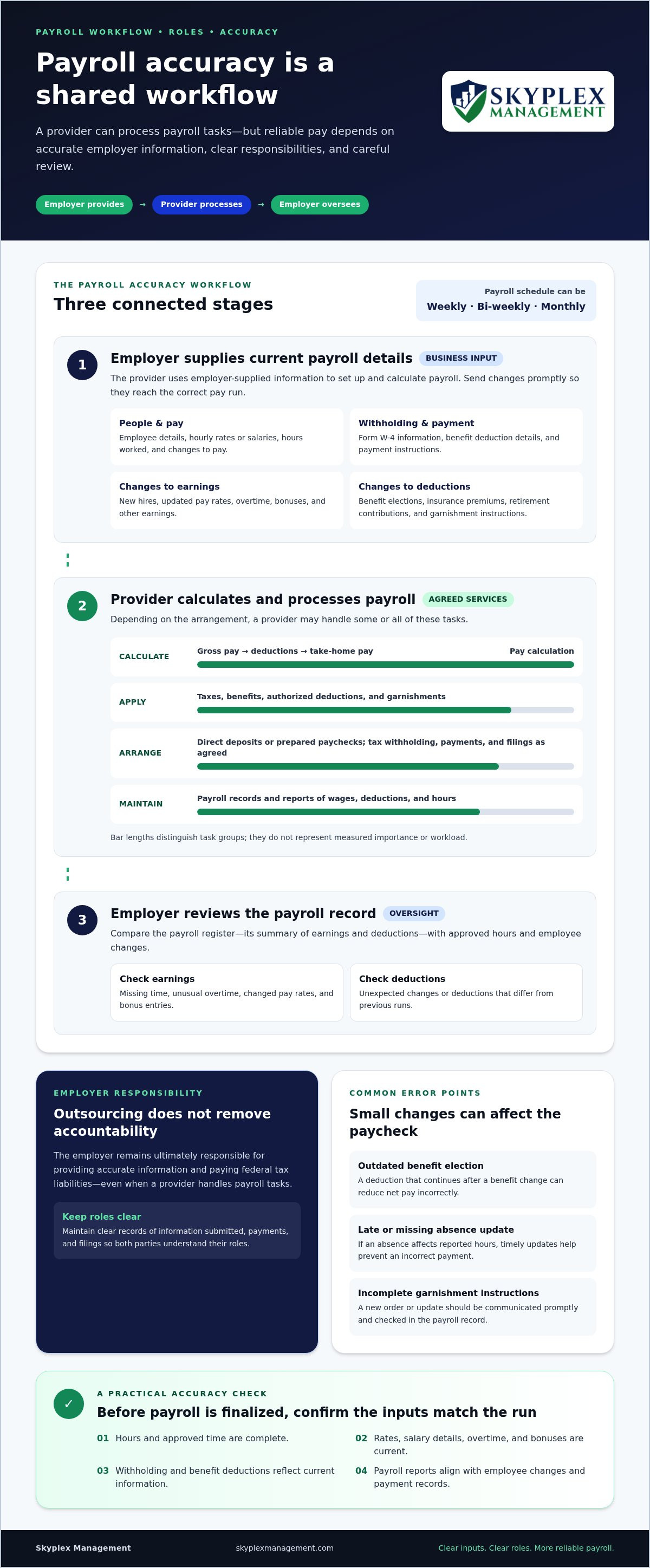
To set up and run payroll, employers provide employee details, pay rates or salary, hours worked, and changes affecting pay. They also supply withholding information, such as each employee’s Form W-4, along with relevant benefit deduction details and payment information. The provider uses these inputs to calculate wages, withhold deductions, and arrange payments. Employers should send changes promptly so a new hire, updated rate, or revised withholding information reaches payroll before processing.
Employee benefits may also flow through payroll. A provider may coordinate deductions for health insurance premiums, retirement contributions, or a 401(k) plan, based on the information supplied by the employer. Correct deduction amounts matter: a missing benefit election or outdated contribution detail can change an employee’s net pay, the amount received after deductions.
Payroll processing can include collecting hours, applying salary or hourly rates, accounting for overtime or bonuses, and deducting taxes and benefits. Providers may arrange employee payments by direct deposit or prepare paychecks. Payroll reports can summarize wages, deductions, and hours, helping employers review what was paid and how the totals were calculated.
Outsourcing doesn’t transfer every obligation. Employers remain ultimately responsible for providing accurate data and paying federal tax liabilities, even when a provider handles payroll tasks. A provider may administer payroll and employment taxes on the employer’s behalf when the employer supplies the funds. Clear records of submitted information, payments, and filings help both parties understand their roles.
Whether payroll is handled internally or outsourced, a clear division of tasks supports accurate processing. Businesses looking for help coordinating payroll tasks can explore payroll service support as part of their payroll workflow.
Payroll processing and wage calculations
Payroll processing turns approved employee hours and pay details into paycheck amounts. A provider applies the business’s payroll schedule, earnings, deductions, and payment instructions to each payroll run.
Wage Calculations and Paychecks
Wage calculations determine gross pay, the amount earned before deductions, and take-home pay. For an hourly employee, the provider uses submitted hours and the employee’s pay rate. For a salaried employee, it uses the salary details supplied by the employer.
Calculations can also account for overtime, bonuses, and other earnings. For example, if a worker receives a bonus during a pay period, that amount must be included in the payroll record before the provider calculates deductions and prepares the paycheck. Businesses may run payroll weekly, bi-weekly, or monthly, so submitted time and changes must match the selected cycle.
Payroll Deductions
Payroll deductions are amounts taken from gross pay before the employee receives payment. They can include tax withholding, health insurance premiums, retirement contributions, and other authorized deductions.
Benefits administration often connects plan details with payroll, so a change to an employee’s insurance or retirement contribution affects the correct pay run. Employers should provide updated deduction instructions and review payroll reports for unexpected changes. For instance, a deduction that continues after an employee changes benefit elections can reduce net pay incorrectly.
Garnishment Processing
Garnishment processing applies a legally required deduction to an employee’s wages and directs the withheld amount as instructed. The employer provides the garnishment information, and the payroll provider can calculate and process the deduction as part of payroll.
Because garnishments affect both take-home pay and payment records, accurate setup matters. The business should communicate a new order or update promptly, then review the payroll record to confirm the deduction appears. Missing or incorrectly entered instructions can cause processing errors and compliance concerns.
A useful review compares the payroll register, which summarizes earnings and deductions, with approved hours and employee changes. Check for missing time, unusual overtime, changed pay rates, bonus entries, and deductions that differ from previous runs. A report showing wages, deductions, and hours gives managers a practical way to spot discrepancies before approving payroll.
Providers can streamline recurring calculations, but they rely on complete, timely information from the business. Late time records or unreported pay changes can lead to incorrect payments, corrections, and potential penalties. Setting a consistent cutoff for hours and approvals helps keep payroll processing on schedule.
If reviewing pay runs and deductions is taking time away from operations, discuss payroll support that fits your workflow.
Payroll tax withholding, filing, and compliance
Payroll tax work can include calculating withholdings, depositing funds, filing returns, and tracking reporting requirements. The provider’s role depends on its authorization and the tasks assigned by the employer.
Federal and State Regulations
Payroll compliance means applying relevant tax and employment requirements to each worker and jurisdiction. Calculations may include federal, state, and local income tax withholding, plus Social Security and Medicare contributions.
Requirements can differ across locations, so a business operating in multiple states must account for each applicable filing process. Payroll systems may also support compliance with wage and hour requirements, including the Fair Labor Standards Act, and reporting requirements connected with the Affordable Care Act. Employers still need to provide accurate employee and pay information.
Tax Compliance and Reporting
Payroll tax reporting records wages, withholdings, and deposits for the applicable filing periods. An authorized reporting agent may submit certain forms, make deposits, or communicate with the Internal Revenue Service on an employer’s behalf.
According to the Internal Revenue Service, an employer appoints a Section 3504 agent using Form 2678, Employer/Payer Appointment of Agent. Reporting agents may need authorization to file particular returns: according to the Internal Revenue Service, they may need to file Form 8655 for authority to file certain forms on a business’s behalf.
Reporting agents do not assume an employer’s tax liabilities. The employer remains responsible for federal tax liabilities, so it should retain payroll reports and monitor tax deposits and filings. Comparing submitted returns with payroll records can help identify a missing or incorrect filing.
Payroll Compliance Management
Compliance management coordinates payroll data, tax calculations, deposits, returns, and recordkeeping. A practical review compares payroll reports with filed returns and payment records, then investigates differences before they carry into another reporting period.
Data protection is also part of the process. Payroll records contain employee and tax details, so providers may use safeguards such as encryption and multi-factor authentication. Employers can support secure handling by limiting access to staff who need payroll information and sharing employee updates through established channels.
Clear authorization matters. A Section 3504 agent and a reporting agent have different roles, and an employer’s arrangement should identify which filings and deposits the agent handles. For example, a business can match each return to the responsible party and keep copies of authorization forms with payroll records.
Payroll compliance is an ongoing workflow, not just a tax filing. Providers may update calculations as tax and labor requirements change, while employers supply accurate information and review records. For a business with employees in more than one jurisdiction, a consistent process for collecting data, approving payroll, and reconciling deposits helps keep reporting organized.
Tax withholding, remittance, and filing
A payroll provider may calculate and withhold taxes, arrange remittance, and prepare payroll filings. It may also process employee pay, deductions, benefit contributions, and year-end forms such as W-2 and 1099-NEC.
Tax Withholding and Remittance
Tax withholding deducts required amounts from employee pay, while remittance transfers collected taxes to the appropriate authority. Calculations can include federal, state, and local income taxes, plus Social Security and Medicare contributions.
U.S. employers must make federal tax deposits through electronic funds transfer. The U.S. Department of the Treasury’s EFTPS allows employers to make and verify federal tax payments 24 hours a day, 7 days a week. Comparing payroll reports with payment records helps identify a missed or mismatched deposit.
Withholding depends on employee information and payroll details supplied to the provider. A revised Form W-4, a new employee, or a benefit deduction update can affect the next payroll calculation. Employers should send changes promptly, then review the resulting payroll records before relying on totals for reporting.
Tax Filing and Year-End Forms
Payroll tax filing reports wages, taxes withheld, and related payments to the appropriate authorities. Depending on the employer’s requirements and the provider’s authorized role, a provider may prepare or submit payroll tax forms on the business’s behalf.
At year end, some providers prepare employee Forms W-2 and contractor Forms 1099-NEC. These forms summarize payments and tax information for the year, so names, identification details, compensation, and withholding records need to match the business’s payroll data.
Accounting software integration can align payroll totals with the business’s financial records. For example, posting payroll summaries to the correct accounts makes it easier to compare wage expenses, tax liabilities, and benefit deductions. Reconcile those entries against payroll reports and tax payments rather than assuming a software update resolves every difference.
Retirement contributions and health benefit deductions also affect year-end payroll records. If an employee’s retirement contribution changes during the year, the payroll system should reflect the new amount in subsequent calculations. Reviewing year-to-date totals before forms are prepared can surface discrepancies while records are still accessible.
Keep copies of filed returns, payment confirmations, and year-end forms with payroll reports. These records help answer questions about a filing or payment and support comparisons between reported wages and amounts recorded throughout the year. Clear handoffs between the employer and provider also help prevent missing updates from carrying into later filings.
Payroll accuracy and error reduction
Payroll accuracy depends on reliable data, consistent review, and clear handoffs between the employer and provider. A provider can process information efficiently, but an incorrect hours file or outdated pay rate can still result in an incorrect payment.
Start with the source data. Time and attendance integrations can transfer approved hours directly into payroll, reducing manual re-entry. Before running payroll with a new provider, review bank details, employee records, and tax information. For example, a transposed bank account digit can disrupt a direct deposit even when the wage calculation is correct.
Providers offer tools to support a smoother process, including automated calculations, payroll reports, and accounting software connections. These features help move information between systems, but the business still needs to review exceptions. Compare the payroll register with approved hours and recent employee changes. Look for missing hours, duplicate entries, changed pay rates, unexpected deductions, and employees who should no longer appear.
A practical review can follow a repeatable sequence:
- Confirm submitted hours against approved time records.
- Review pay rates, overtime, bonuses, and employee changes.
- Compare deductions and benefit entries with current instructions.
- Check the payroll register against the expected total payment.
- After processing, compare direct deposit results and payroll reports with accounting records.
Each review targets a different source of error. For instance, if a worker’s approved time includes a shift that payroll omitted, the hours review can catch the mismatch before processing. If gross pay looks right but a retirement deduction changed unexpectedly, review the employee’s current benefit information.
Reconciliation after payroll adds another control. Match payroll totals to the accounting records, including wages, deductions, and payroll tax liabilities. If an accounting entry differs from the payroll report, trace the difference to its source instead of making an unexplained adjustment. Consistent reconciliation also makes repeated errors easier to spot, such as a recurring missing time entry from one department.
Assign clear ownership for each handoff. A manager might approve time, an administrator submit employee updates, and the business owner review the final payroll report. This sequence helps prevent an unapproved change from entering payroll unnoticed. Keep a record of corrections, too. If the same error returns, the history can show whether it stemmed from late information, manual entry, or a system integration issue.
Automation can streamline calculations, but review remains essential. A payroll system processes the data it receives; a careful approval and reconciliation process helps ensure the inputs and results are accurate.
Skyplex Management: Small Business Bookkeeping
Skyplex Management helps small businesses manage payroll alongside the bookkeeping and accounting records that support clear financial decisions. Turn to the firm when payroll administration is taking time away from daily operations, payroll entries need to align with your books, or you need QuickBooks Online support or cleanup.
With Payroll Service, Small Business Bookkeeping, and Small Business Accounting, business owners can bring recurring financial tasks into a more organized workflow. Accurate payroll records, for example, make it easier to review wage expenses and understand their effect on the business’s financial picture.
For payroll or related bookkeeping support, contact Skyplex Management to discuss your business needs.
Build a More Connected Payroll Workflow
Use your next payroll review to identify a handoff that could be clearer, such as who approves employee changes or how payroll results are recorded. A defined process helps you see how the responsibilities of a payroll service provider fit into your business’s daily workflow.
Choose a practical improvement, then document who owns it and how you’ll review the result. A clear next step can make payroll easier to manage as your business changes.
With a thoughtful process in place, you can make payroll decisions with greater confidence.
Frequently Asked Questions
What services does a payroll service provider typically handle?
The service scope depends on the arrangement, so define it by deliverables rather than the label “full service.” For example, a written scope can clarify who handles payroll corrections, employee questions, and year-end document distribution. It can also specify which reports the business receives after each run. These details help owners determine whether the service fits their internal workflow before responsibilities are divided.
What payroll tax calculations, filings, and payments is a provider responsible for?
A provider may calculate applicable payroll taxes, submit authorized returns, and arrange tax payments, depending on its assigned role. To understand what occurred, compare the filed return with the payroll register and related bank confirmation. Any difference between reported wages and payroll totals deserves review before the next filing. Keeping these records together makes it easier to trace a discrepancy to a calculation, submission, or payment.
Who is legally liable for payroll errors and unpaid payroll taxes when using a provider?
The employer generally remains responsible for federal employment tax liabilities, even when a provider handles payroll tasks. If an error or tax notice arises, gather the notice, payroll reports, filing copies, payment confirmations, and messages about the affected pay period. These records help establish what information was submitted and what action followed. Respond promptly, since an unresolved discrepancy can carry into later payroll periods or filings.
How do payroll provider responsibilities differ from an employer's responsibilities?
The provider performs the assigned processing work, while the employer oversees the business’s payroll information and obligations. To distinguish the roles, document who approves changes, who submits them, and who reviews completed payroll. For example, one person can approve employee pay updates and another review the final register. Clear ownership reduces confusion when a change arrives close to a payroll cutoff.
How do full-service payroll providers compare with payroll software or an in-house payroll team?
The key difference is how much payroll work stays inside the business. With software, staff operate the system and manage its workflow; a full-service provider performs tasks assigned under the service arrangement. An in-house team keeps payroll operations internal and relies on the business’s own staffing and procedures. When comparing these approaches, consider how the business wants to handle oversight, employee questions, and continuity.
What should employers check when choosing a payroll service provider?
Ask for a clear description of the work included, the records delivered after processing, and the procedure for correcting errors. Review a sample payroll report to see whether it provides the details your business needs for accounting review. Also clarify how tax notices are routed and who responds. These practical checks show how the working relationship functions beyond the initial setup.
What are the risks of outsourcing payroll, including data security and compliance issues?
Outsourcing creates handoffs where missing updates, unclear approvals, or incorrect employee details can affect payroll. Limit access to payroll information to people who need it, use secure file-sharing practices, and remove access when a staff member no longer handles payroll. Keep an internal copy of key reports and confirmations. These steps preserve business oversight and make it easier to investigate a problem without relying on one person’s inbox.
How does payroll provider compliance vary by state and local jurisdiction?
Payroll requirements can differ by state and local jurisdiction, so employee work location is important to record. For a Northeast Ohio business with employees in Cleveland and Akron, record each worker’s actual work location rather than assuming one location applies to everyone. If the workforce expands into another jurisdiction, review the payroll setup and reporting workflow for that location before processing employees there.
Disclaimer
The information provided in this article is for general educational purposes only and should not be considered accounting, tax, or legal advice. Every business is unique. Consult a qualified accounting professional before making financial or tax decisions. Contact Skyplex Management for guidance specific to your business.


